7  Clustering Genesets

7.1 Learning Objectives

By the end of this session, you should be able to:

  • Explain the difference between euclidean and correlation distances and interpret a distance matrix
  • Explain why row scaling can be misleading in clustering
  • Step through the basic steps of hierarchical clustering and interpret clustering trees
  • Run clustering methods to produce clusters in your data with the {pheatmap} package
  • Visualize clusters to assess validity

7.2 What is Clustering?

Clustering is a method for finding groupings in data.

The data must be at least ordinal (categorical or continuous, but with some implied order) and in matrix format. The data does not all have to be the same type (you can mix continuous and categorical)

In the case of expression data, the counts are in matrix form, which means we can utilize them for clustering.

library(SummarizedExperiment)
library(tidySummarizedExperiment)
library(DESeq2)
library(tidyverse)
library(pheatmap)

gse_results <- readRDS("data/gse_results.rds")
gse_model <- readRDS("data/GSE96870_fit.rds")

geneset <- gse_results |>
  as.data.frame() |>
  filter(padj < 0.05) |>
  rownames()

gse_data <- assay(gse_model)[rownames(gse_model) %in% geneset,]

head(gse_data)
              GSM2545337 GSM2545338 GSM2545348 GSM2545353 GSM2545343 GSM2545349
Gm35287               21         24         29         40         27         33
Gm13562               31         44         34         44         45         36
A930006I01Rik          3          7          6          2          9          4
Pla2g4e              260        258        319        328        242        319
Slc17a9               12         11         18         17         18         24
Gm29797              105         99        105        123         92         69
              GSM2545354 GSM2545339 GSM2545344 GSM2545352 GSM2545362 GSM2545340
Gm35287               23         19         34         69         44         55
Gm13562               46         34         20         27         17         22
A930006I01Rik          4          4          1          2          2          3
Pla2g4e              275        263        266        551        683        457
Slc17a9               20         11         18         32         48         15
Gm29797               84        106         93        111         64         83
              GSM2545345 GSM2545350 GSM2545363 GSM2545336 GSM2545342 GSM2545351
Gm35287               62         28         56        106         96         80
Gm13562               27         45         34         12         13          9
A930006I01Rik          0          2          1          1          0          0
Pla2g4e              324        316        290       1064        878        911
Slc17a9               21         19         33         66         44         62
Gm29797               73        116        109         30         23         34
              GSM2545380 GSM2545341 GSM2545346 GSM2545347
Gm35287              126         79         91         83
Gm13562               15         10          9          9
A930006I01Rik          0          0          0          0
Pla2g4e              983       1415        814       1037
Slc17a9               95        105         66         82
Gm29797               31         14         17         21

Our data is in matrix form, which is what pheatmap expects.

Matrices are different than data.frames

The matrix structure looks like a data.frame, but actually has more in common with a vector. Specifically:

  • All columns must have the same type (numeric, logical, factor)
  • A matrix has row names as well as column names

The matrix format can be derived using the assay() method, or data.frames that all have the same column type can be converted to matrix using as.matrix().

7.3 pheatmap package

We will use the pheatmap package as it is highly customizable in terms of the presentation.

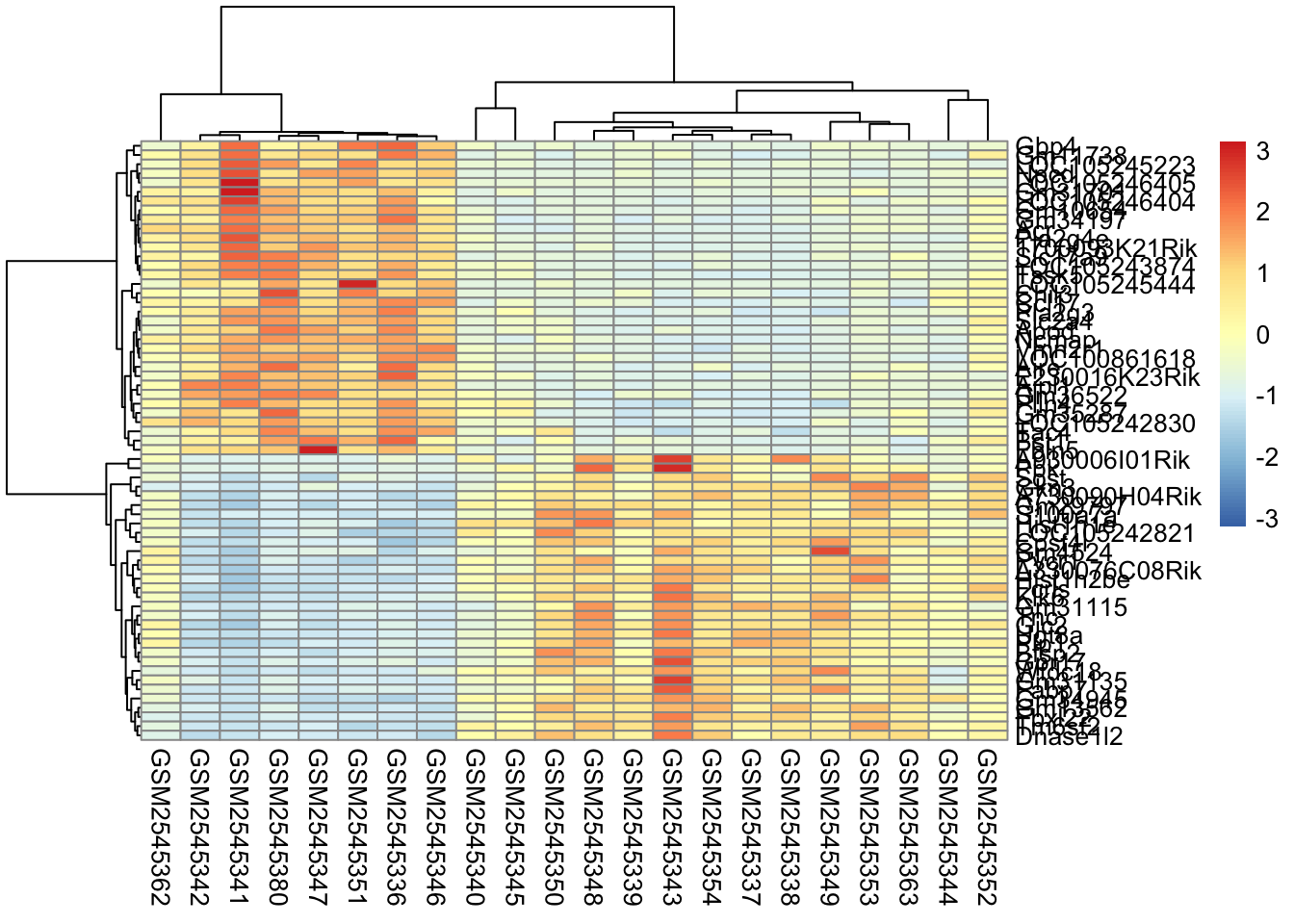
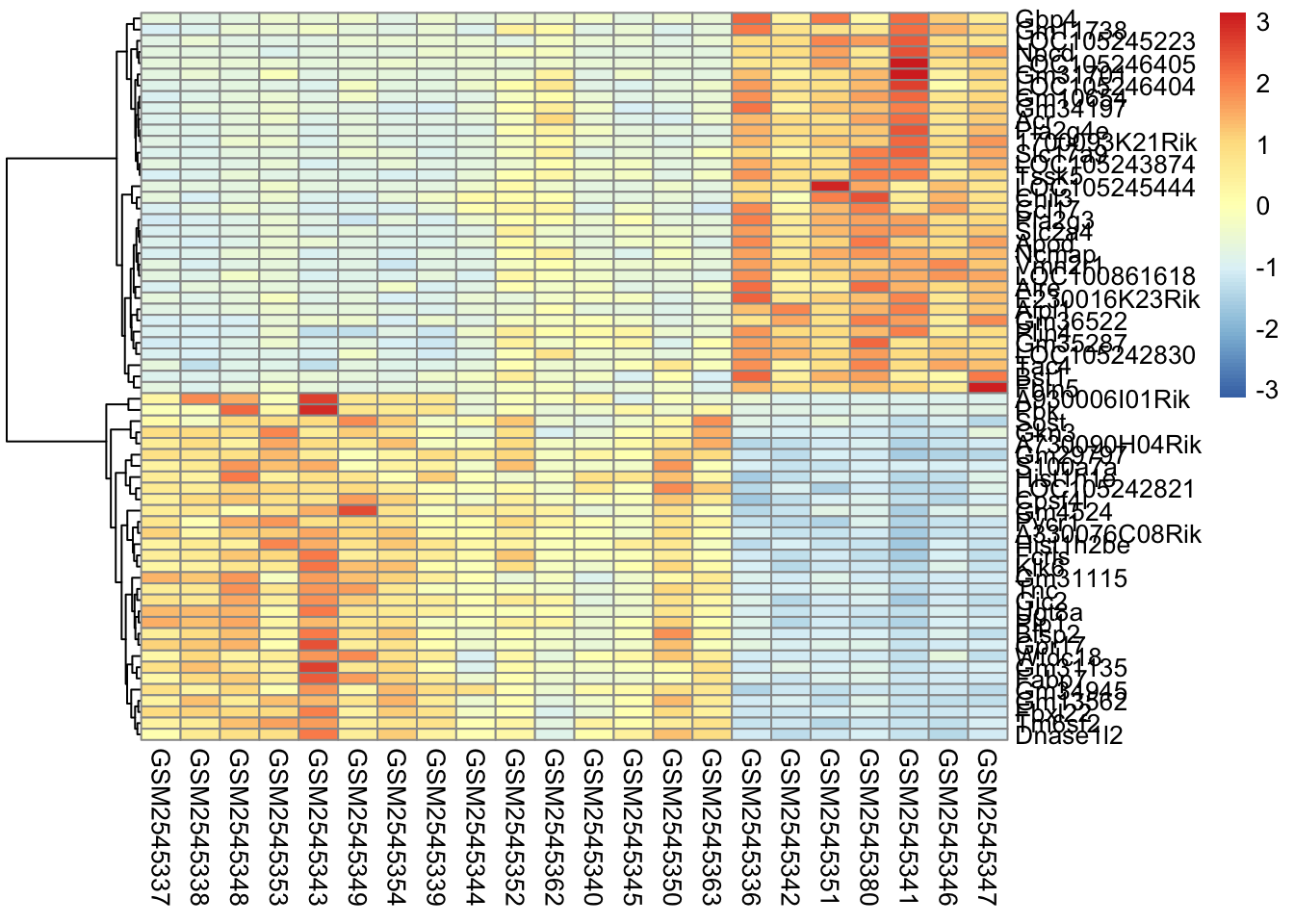
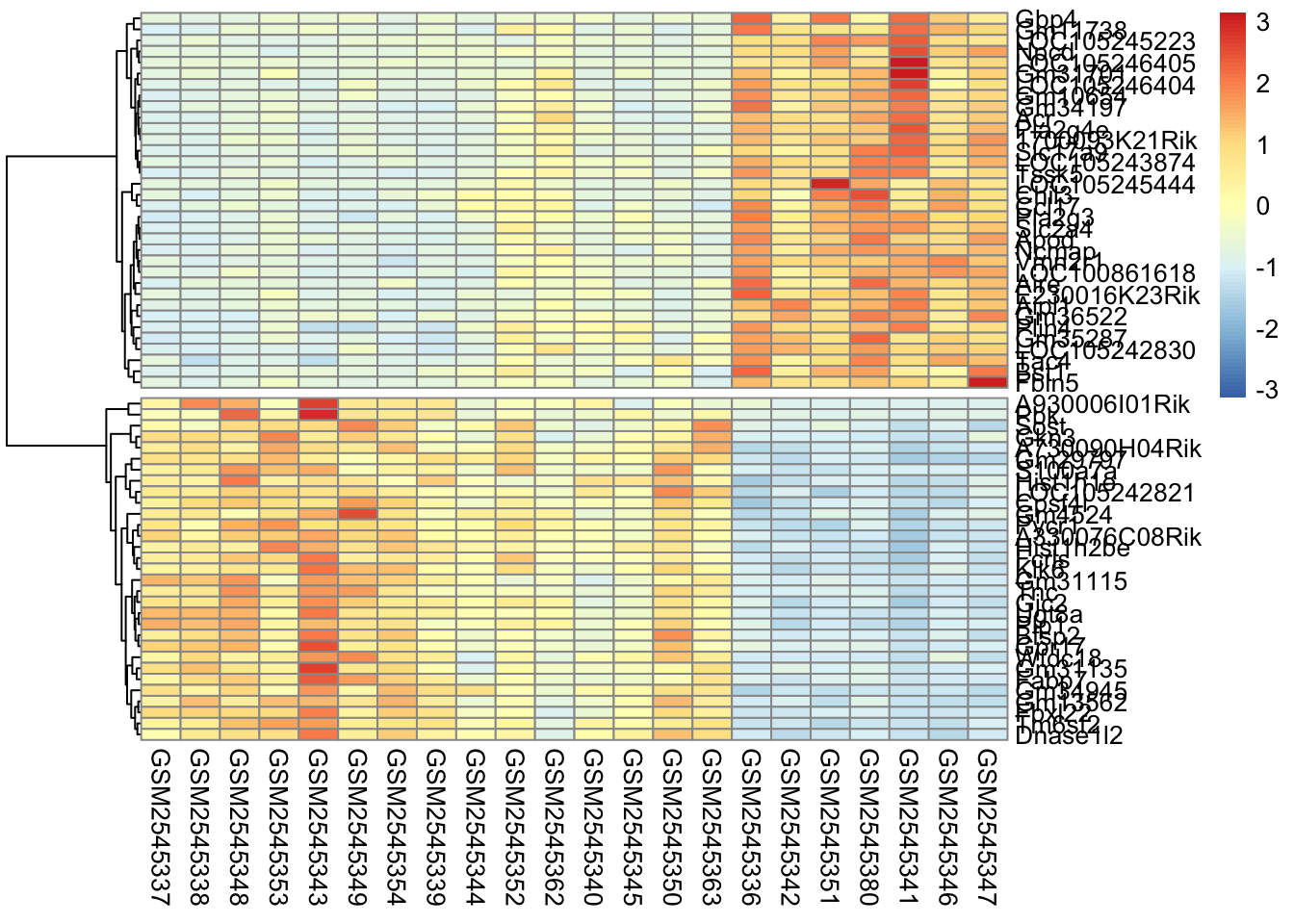
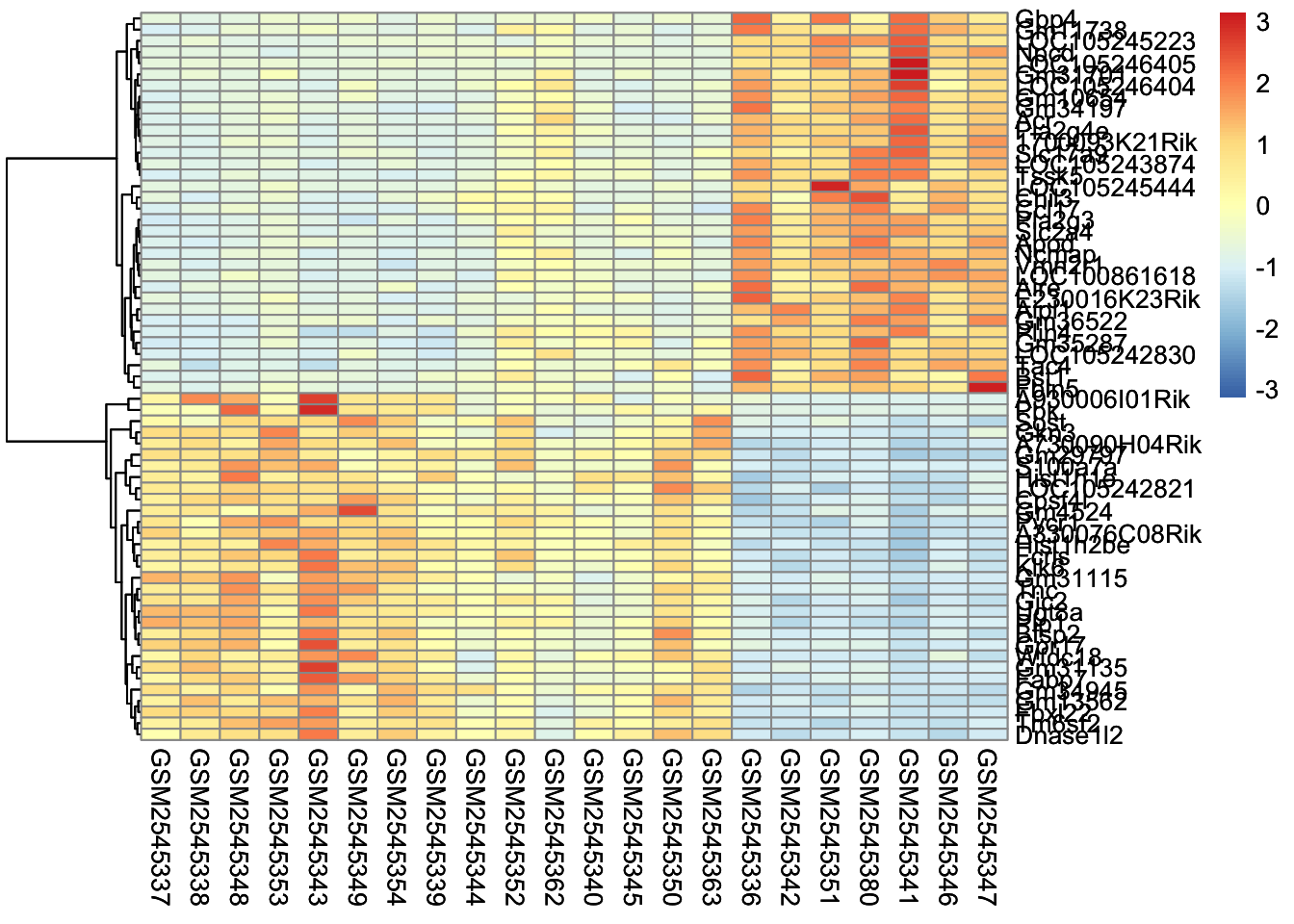
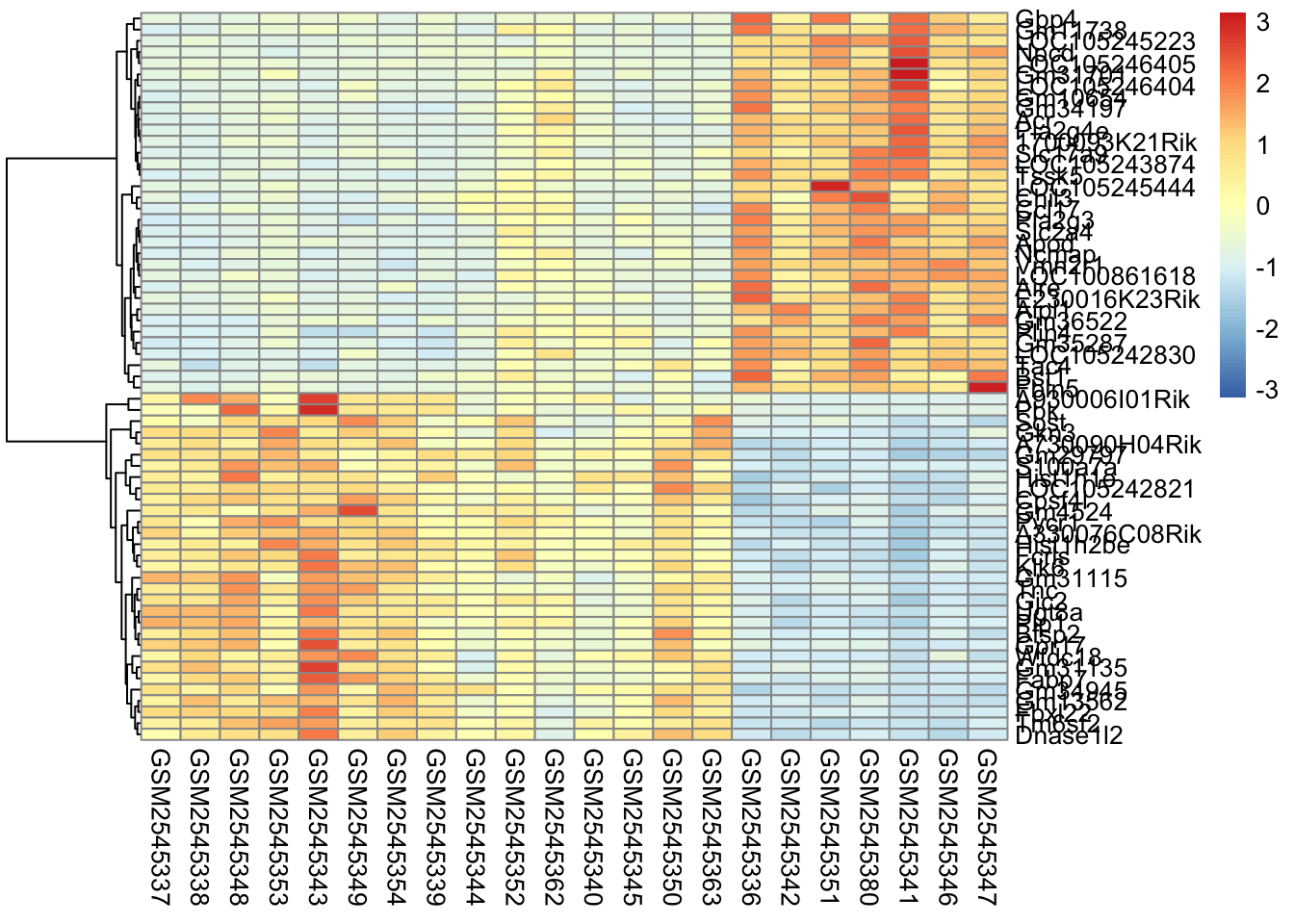
Here’s what is considered a fairly standard heatmap of our geneset.

cluster_rows <- pheatmap(gse_data, 
         cluster_rows = T, cluster_cols = F, 
         clustering_distance_rows = 'correlation',
         scale="row")

cluster_rows

7.4 Cluster by Rows, Columns, or Both

The first option we have is to cluster by rows, columns, or both.

Clustering is largely about ordering the data. For row based clusterin, we order the rows based on how similar the rows are to each other (we’ll cover this in the distance section).

For row-based clustering, we need to specify both the cluster_rows argument and the clustering_distance_rows argument.

pheatmap(gse_data, 
         cluster_rows = TRUE, cluster_cols = FALSE, 
         clustering_distance_rows = 'correlation',
         scale="row")

Column based clustering sorts the columns based on how similar they are to each other. Without the sample annotation for columns, it is hard to see how the columns are related to each other.

pheatmap(gse_data, 
         cluster_rows = FALSE, cluster_cols = TRUE, 
         clustering_distance_cols = 'correlation',
         scale="row")

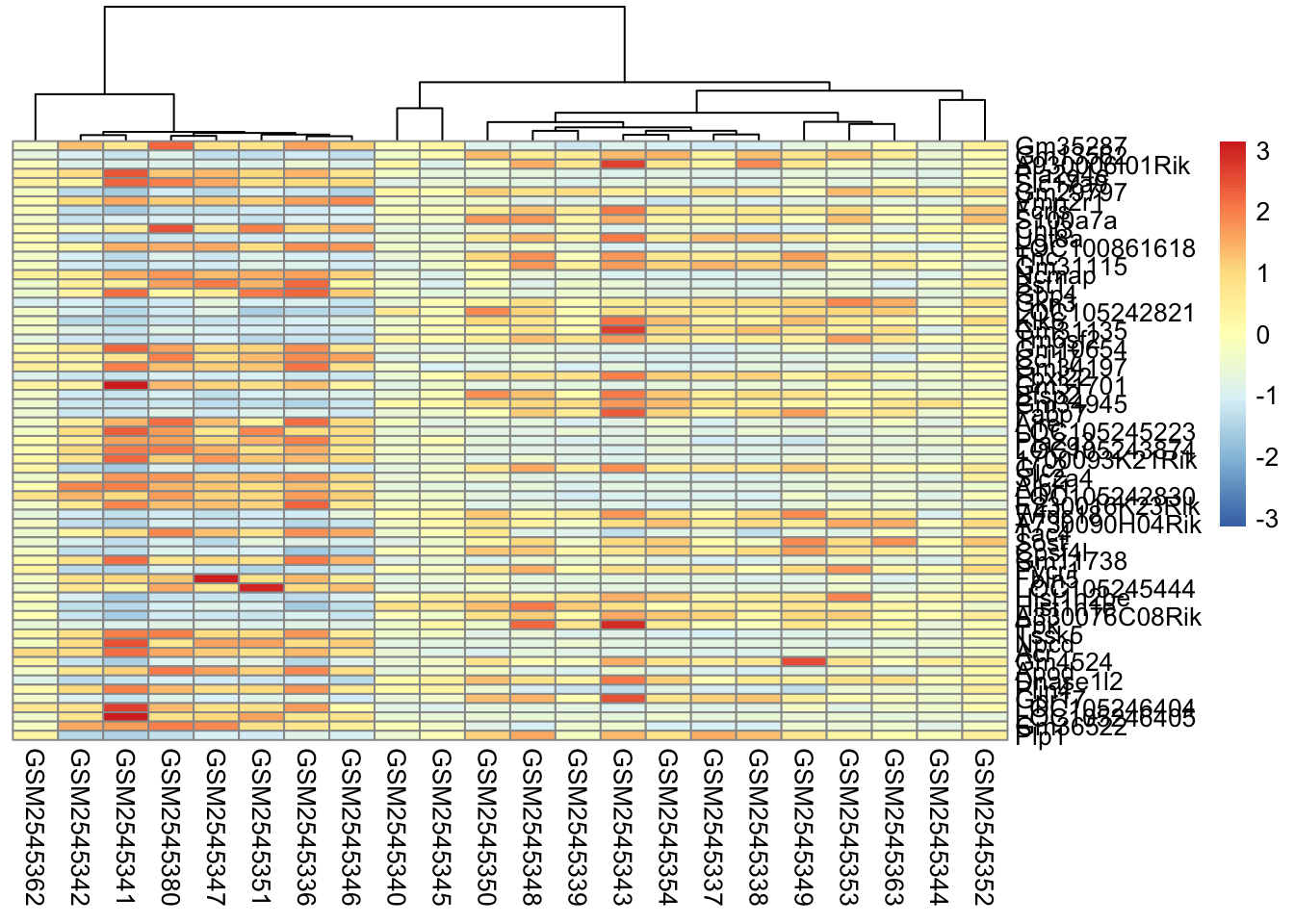
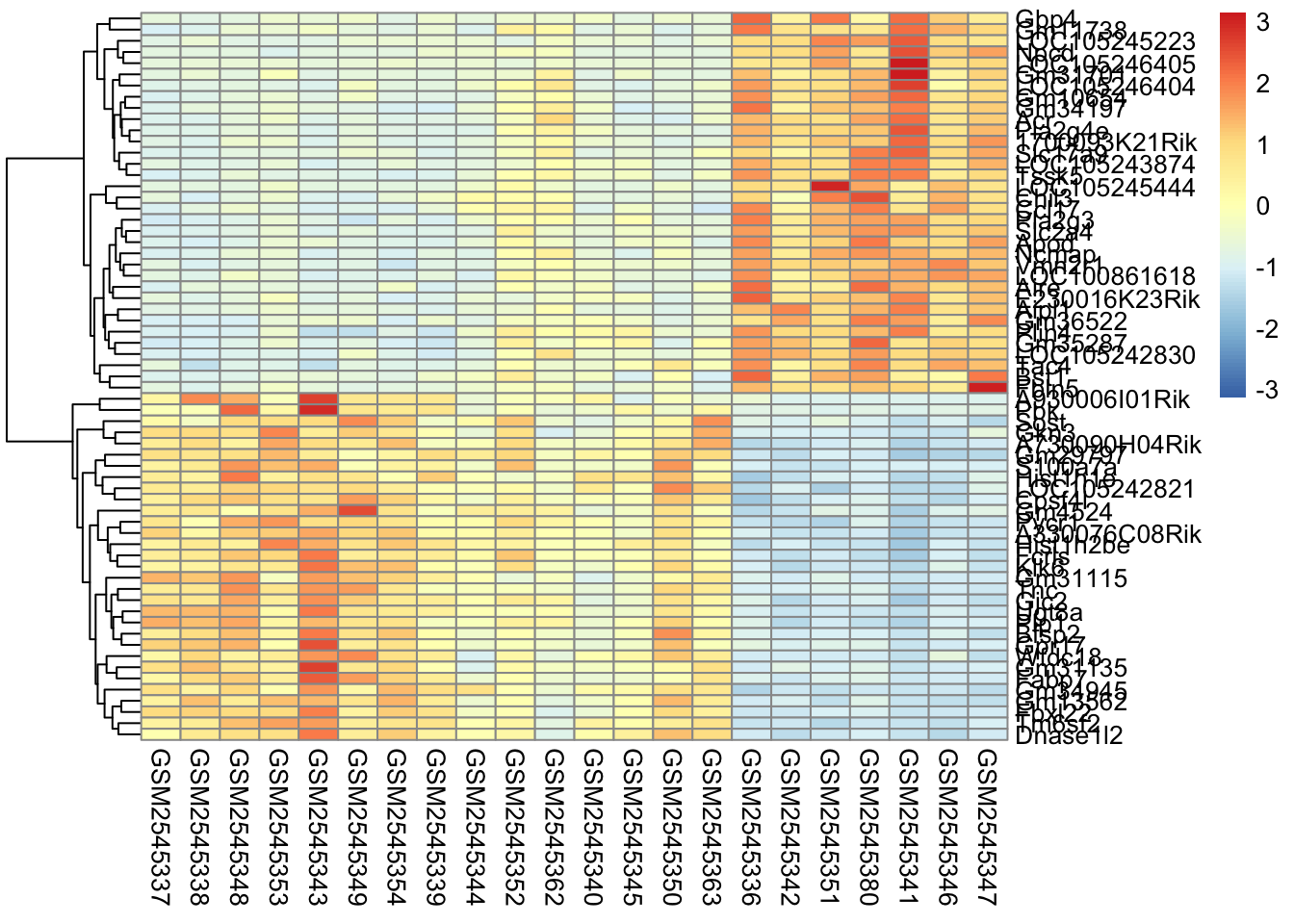
Finally, we can do both, which gives us both a row and column dendrogram:

pheatmap(gse_data, 
         cluster_rows = TRUE, cluster_cols = TRUE, 
         clustering_distance_cols = 'correlation',
         clustering_distance_rows = 'correlation',
         scale="row")

Which one should you use? It depends on the application:

  • Row clustering is helpful for seeing expression relationships in the data
  • Column clustering is helpful for seeing sample relationships in the data
  • Both gives you both.

In our case, since the samples are related by time, it makes the most sense for us to only do the row-based clustering.

Garbage In, Garbage Out

Clustering algorithms will always give you an answer. Whether the grouping makes sense or not depends on the quality of data you are including. Cleaning and filtering your data prior to putting it in a clustering algorithm is critical.

Missing data can also affect the output of a clustering, so it is critical to assess whether how much of your data is missing. Some methods have explicit ways to deal with missing values (such as imputation) and it’s important to understand what the methods are doing.

It’s also important to assess what is signal and what is noise. Clustering algorithms are highly sensitive to noise.

7.5 Scaling

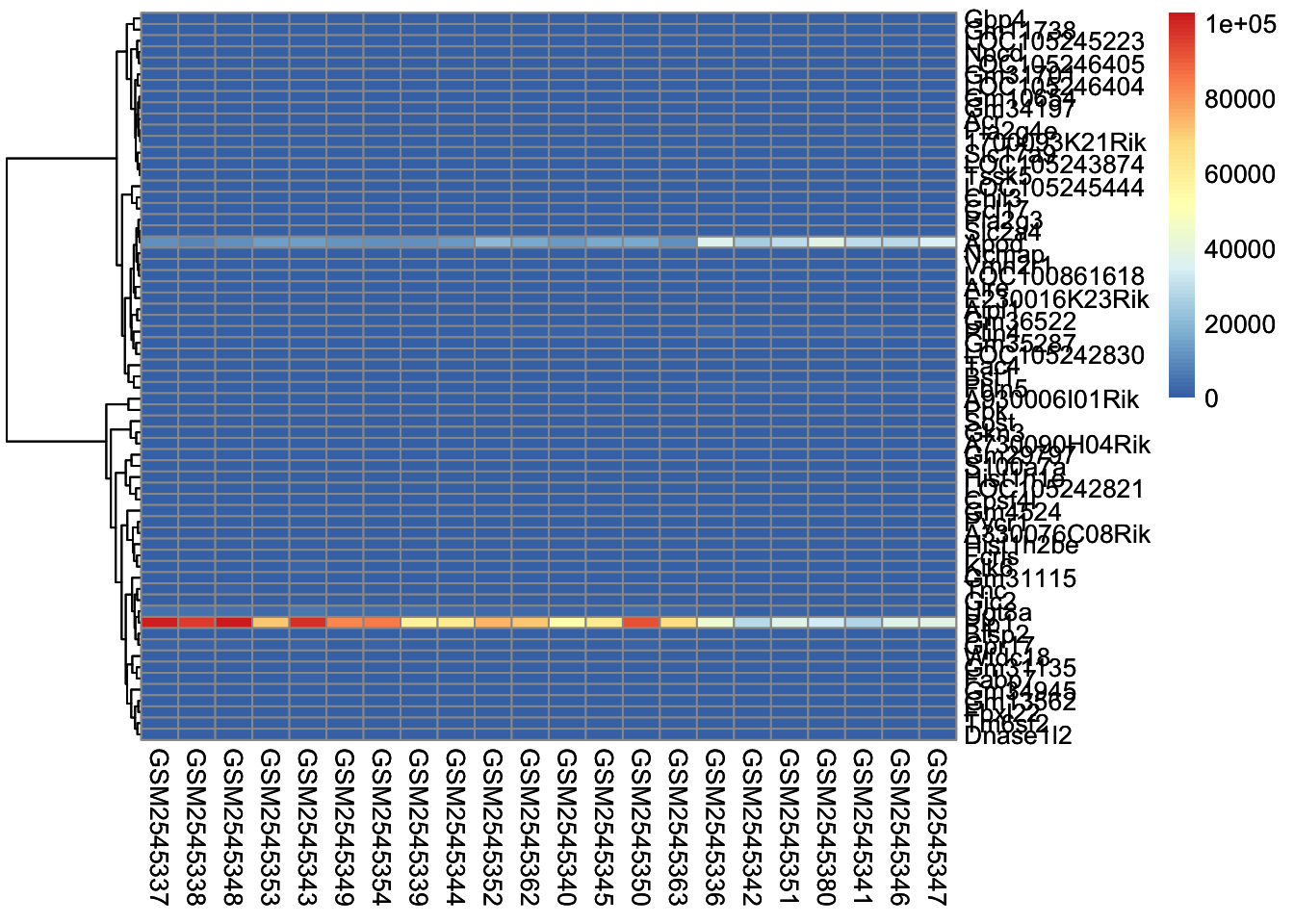
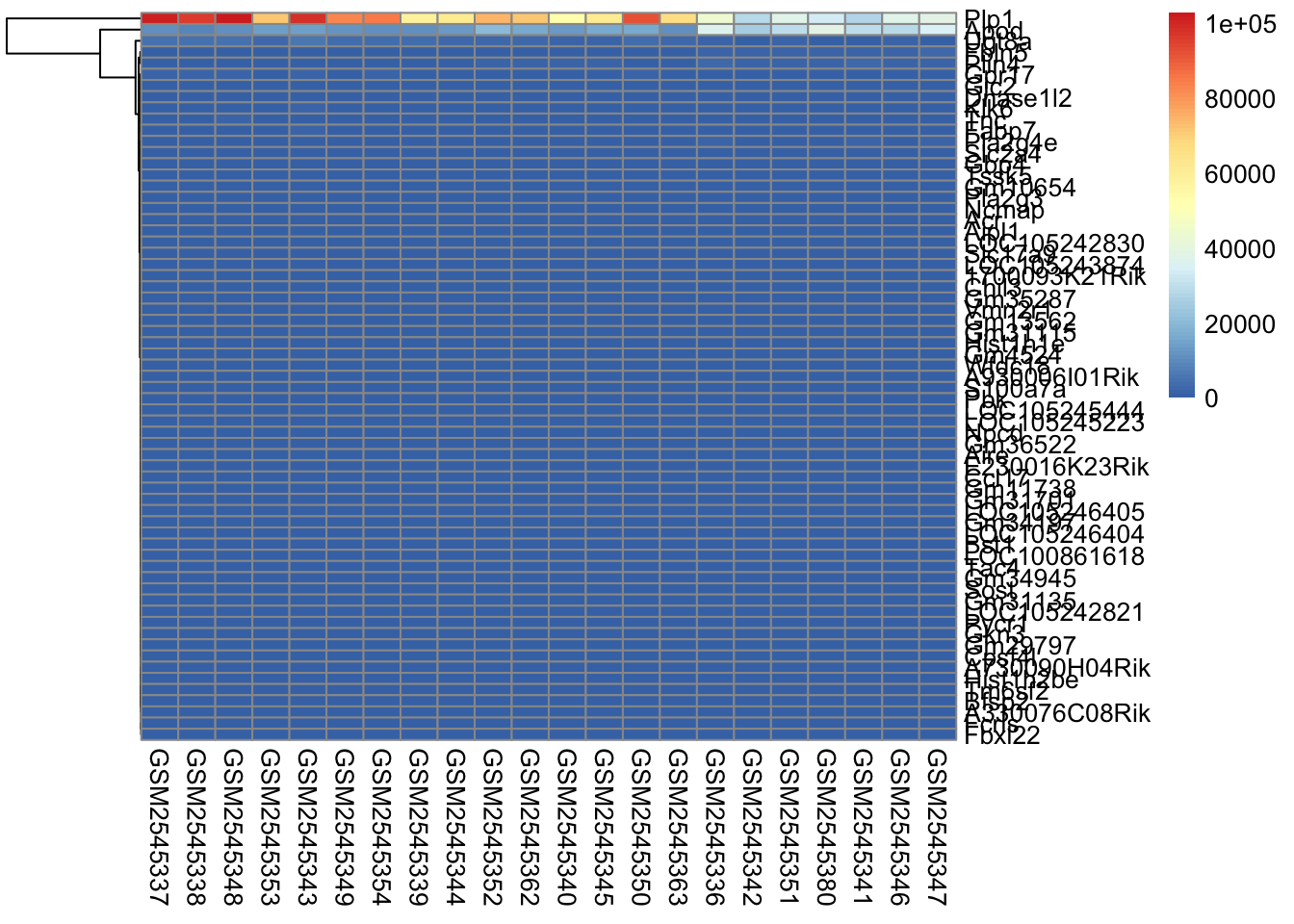
The next parameter we’ll investigate is the scale parameter. Try running the below code, which does no scaling and compare it with the heatmap above. What do you notice?

scaled_heatmap <- pheatmap(gse_data, 
         cluster_rows = TRUE, 
         cluster_cols = FALSE, # set to FALSE if you want to remove the dendograms
#         clustering_distance_cols = 'euclidean',
         clustering_distance_rows = 'correlation',
         scale="none")

scaled_heatmap

Without scaling, we are plotting the normalized counts in our heatmap. There are two genes with very high expression, Apod, and Plp1, that dominate our heatmap.

So why do we scale? The short answer is that we want to get the expression of each gene to be roughly on the same scale. We do this by calculating the [z-score] for each row of the data.

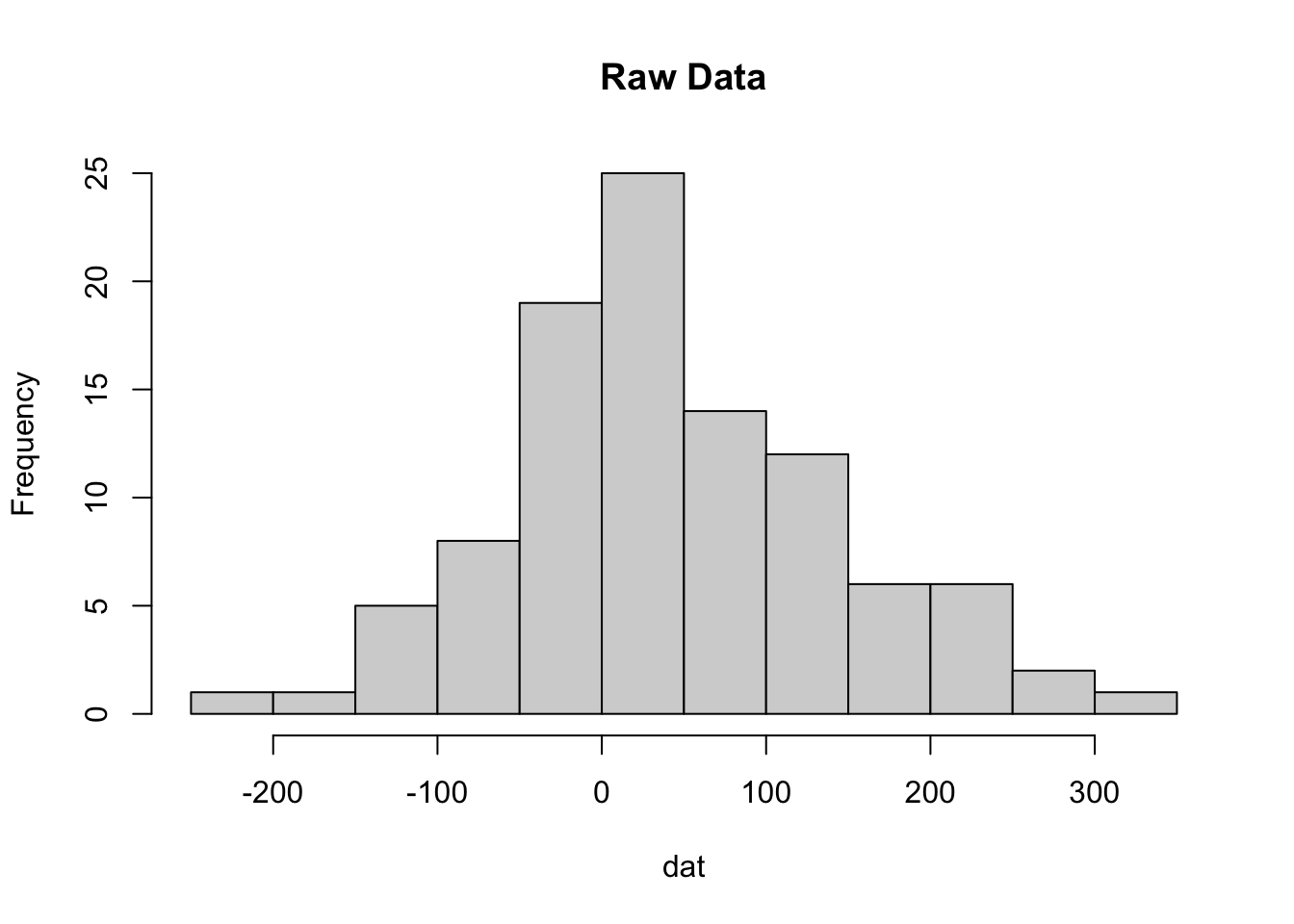
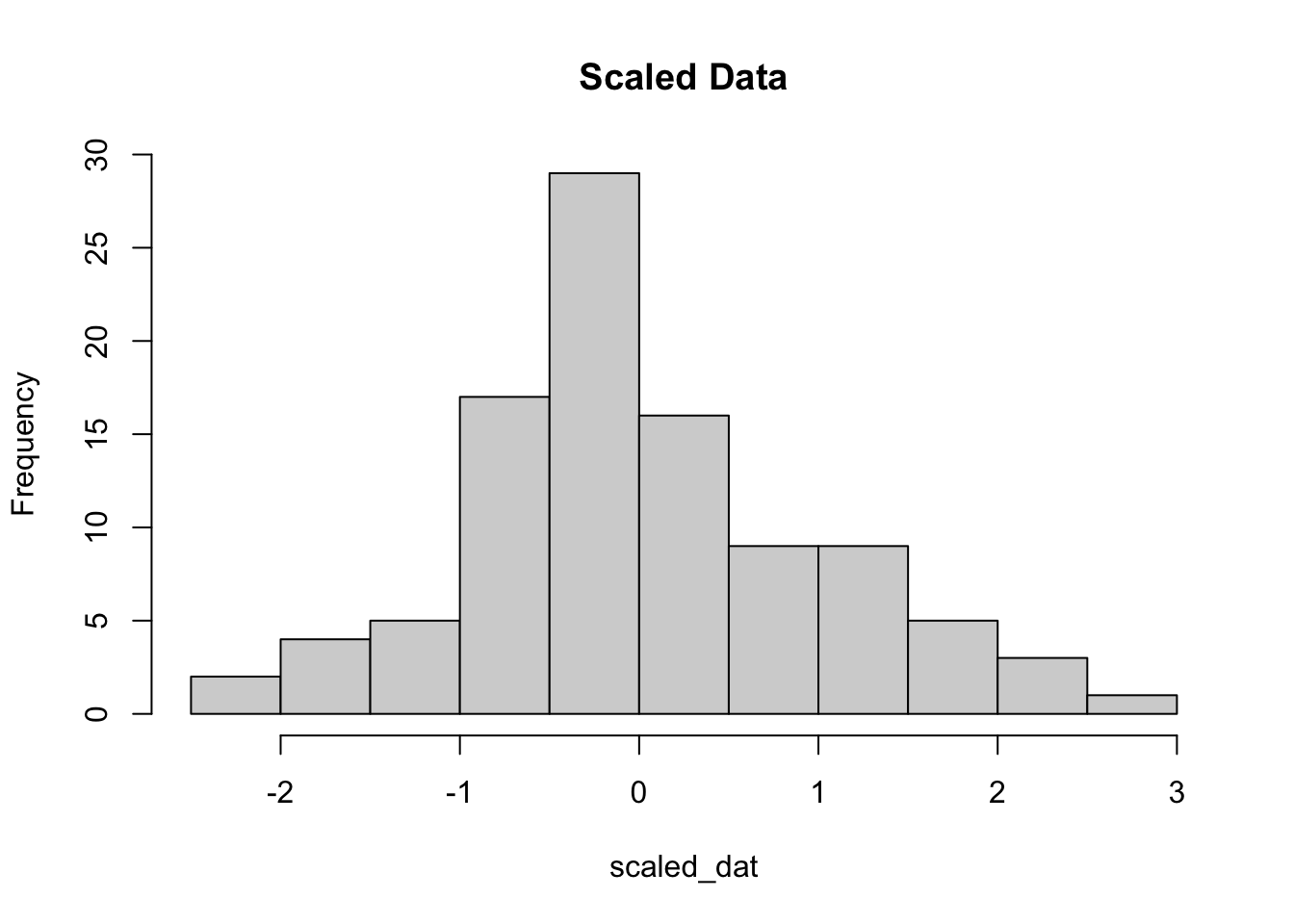
By definition, z-scores have a mean of zero and usually range between 3 and -3 standard deviations. Here is an example using data drawn from a normal distribution. We randomly sample 100 values from the normal distribution with mean 30, and a standard deviation of 100.

dat <- rnorm(100, mean = 50, sd = 100)
dat
  [1]   77.66099886  148.27944455 -176.53933901   11.67528525   41.79271476
  [6]   -8.09609050  228.52433626  -30.73551291  175.98952928   -4.30102344
 [11]  117.31124917   51.20034530  -50.92567197   53.02481092   37.06219464
 [16]  -32.68936389   46.96763186 -203.31039753   77.71188539  -53.03304933
 [21]   11.72804595   40.69052064   14.71001151   -0.08803012  264.14161377
 [26]  235.72470530   48.27572932  188.81427055   -4.84018484   83.99338842
 [31]  -42.42728343  149.24871042  -55.72042112  173.39085021   34.77190269
 [36]   14.94125949    2.09094169   89.11584852  -83.80070527  234.97467848
 [41]   25.87941363 -121.29967038   18.95212064  222.02213938   11.41746311
 [46]   38.85882737    8.84891275  -37.48096992  200.20881357   51.45537836
 [51]  -37.81949238  247.65138623  -28.13267182    3.02349421   83.56911579
 [56]  323.31435728  -33.30382567  -31.33358814   73.41086198  -81.89988811
 [61]  -49.13534458 -128.13804904  103.95213019  105.44076777   -4.43514940
 [66]   17.36384698   -9.63210156   25.92451270   44.02382735  105.71159748
 [71]  105.22194060  161.97432698  149.39167118  -73.32726743  -21.49917189
 [76]   -6.60696463  119.69692907  165.26832726   -6.29497883   81.26966552
 [81] -139.42656452  265.46101140   77.35227875   53.43682312 -142.35128290
 [86]  133.05228567  -74.87491890  108.56681360  158.02687762   81.46759167
 [91]   38.24981770   40.13493435   35.85095999 -100.83554255    3.62837528
 [96]   54.74007009  -51.93749172   41.10186026  133.79945521  -43.61221484
hist(dat, main="Raw Data") 

Then we scale the data using the scale() function:

scaled_dat <- scale(dat)
hist(scaled_dat, main="Scaled Data")

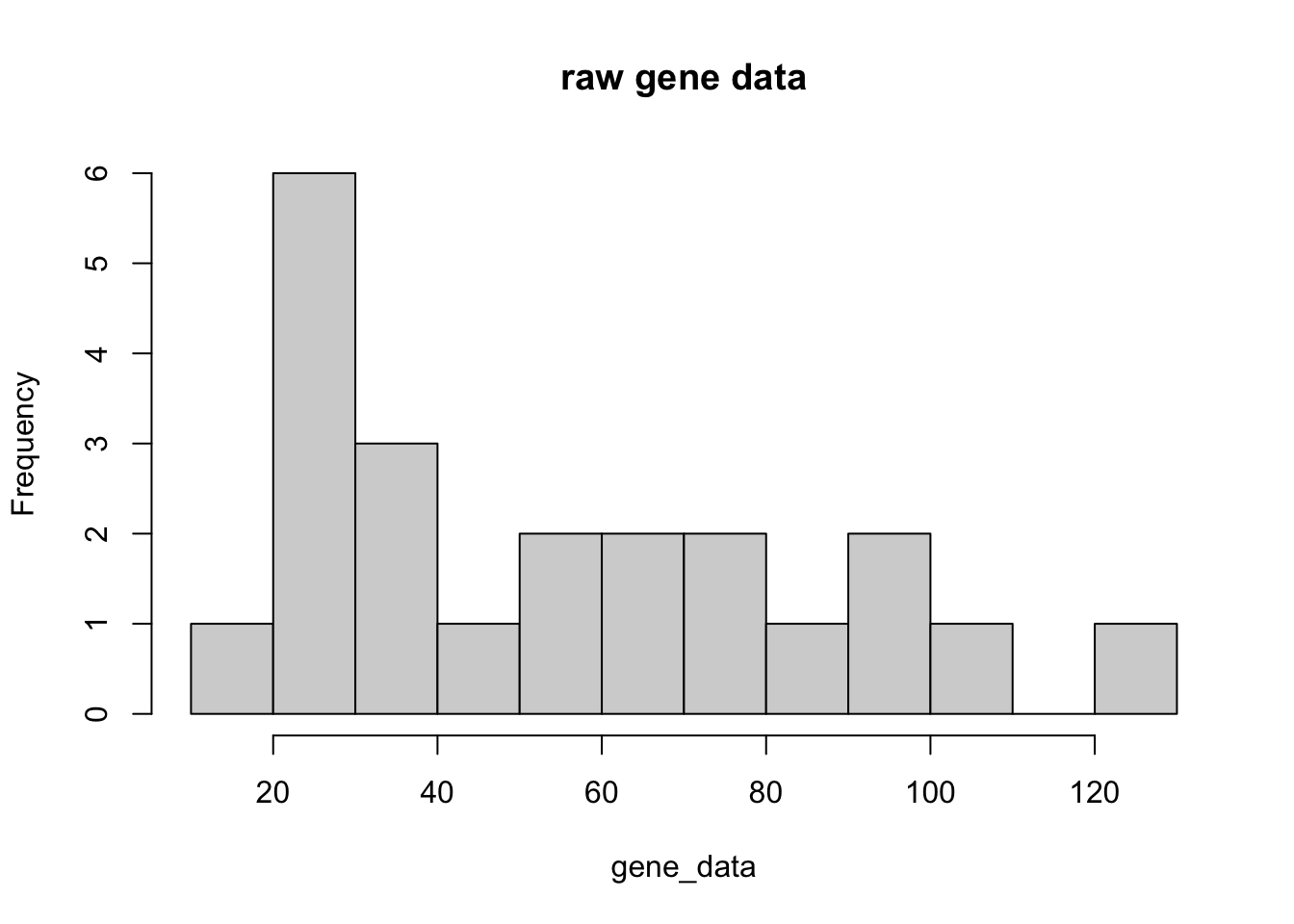
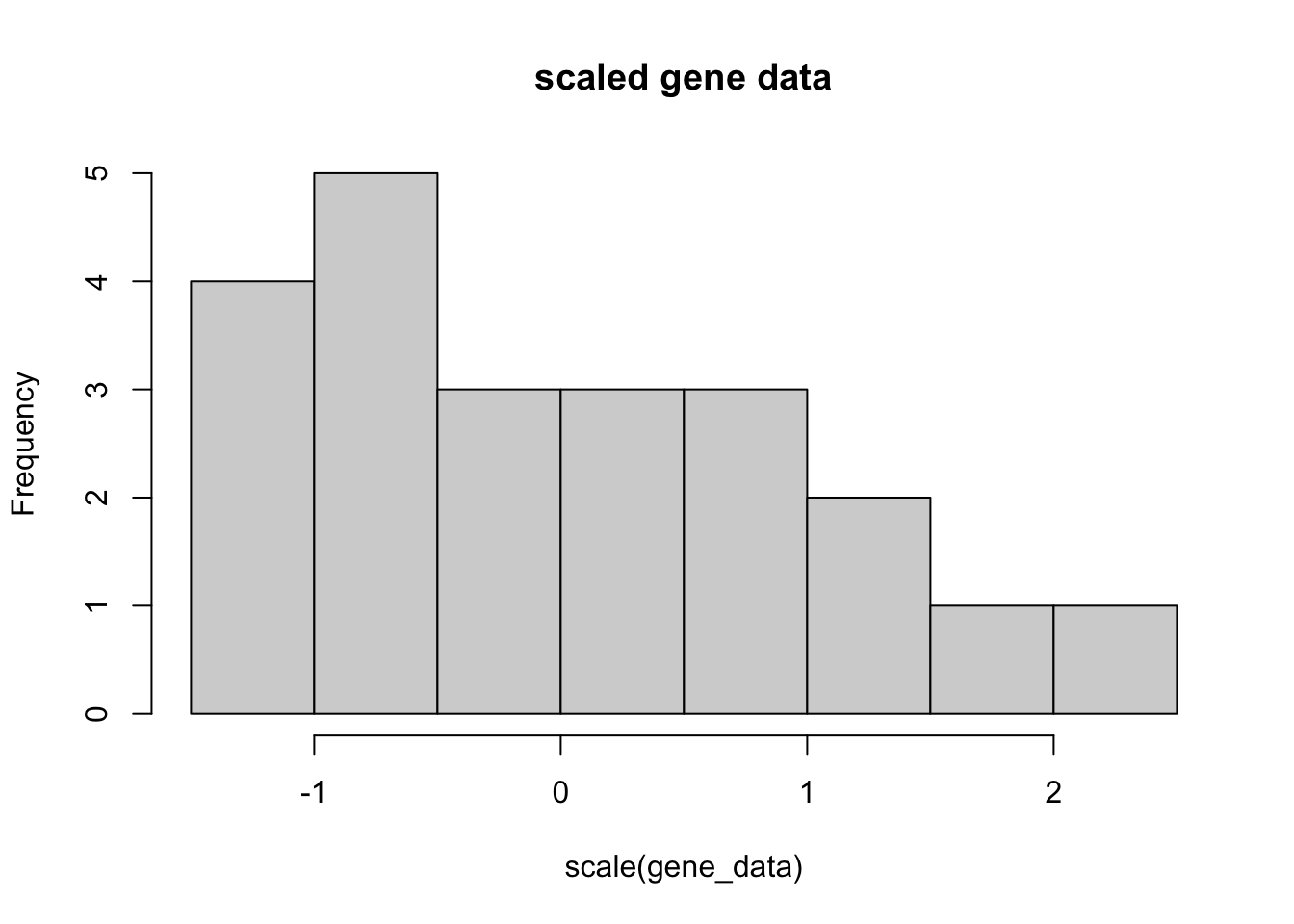
Let’s take one of the genes in our DE set, and scale it.

gene_data <- gse_data[1,]
gene_data
GSM2545337 GSM2545338 GSM2545348 GSM2545353 GSM2545343 GSM2545349 GSM2545354 
        21         24         29         40         27         33         23 
GSM2545339 GSM2545344 GSM2545352 GSM2545362 GSM2545340 GSM2545345 GSM2545350 
        19         34         69         44         55         62         28 
GSM2545363 GSM2545336 GSM2545342 GSM2545351 GSM2545380 GSM2545341 GSM2545346 
        56        106         96         80        126         79         91 
GSM2545347 
        83 
hist(gene_data, main="raw gene data", breaks = 10)

hist(scale(gene_data), main="scaled gene data", breaks = 10)

7.5.1 Try it out

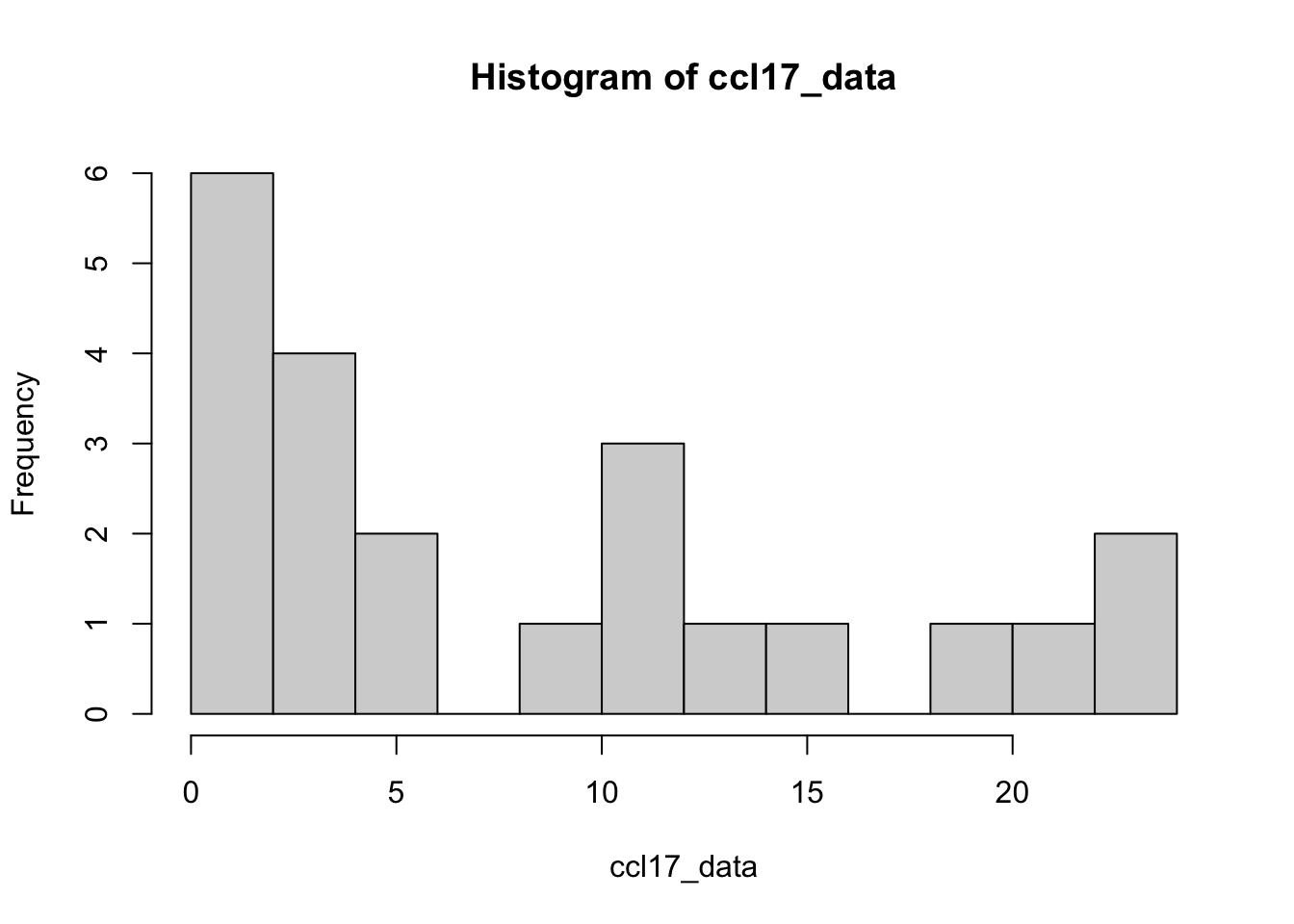
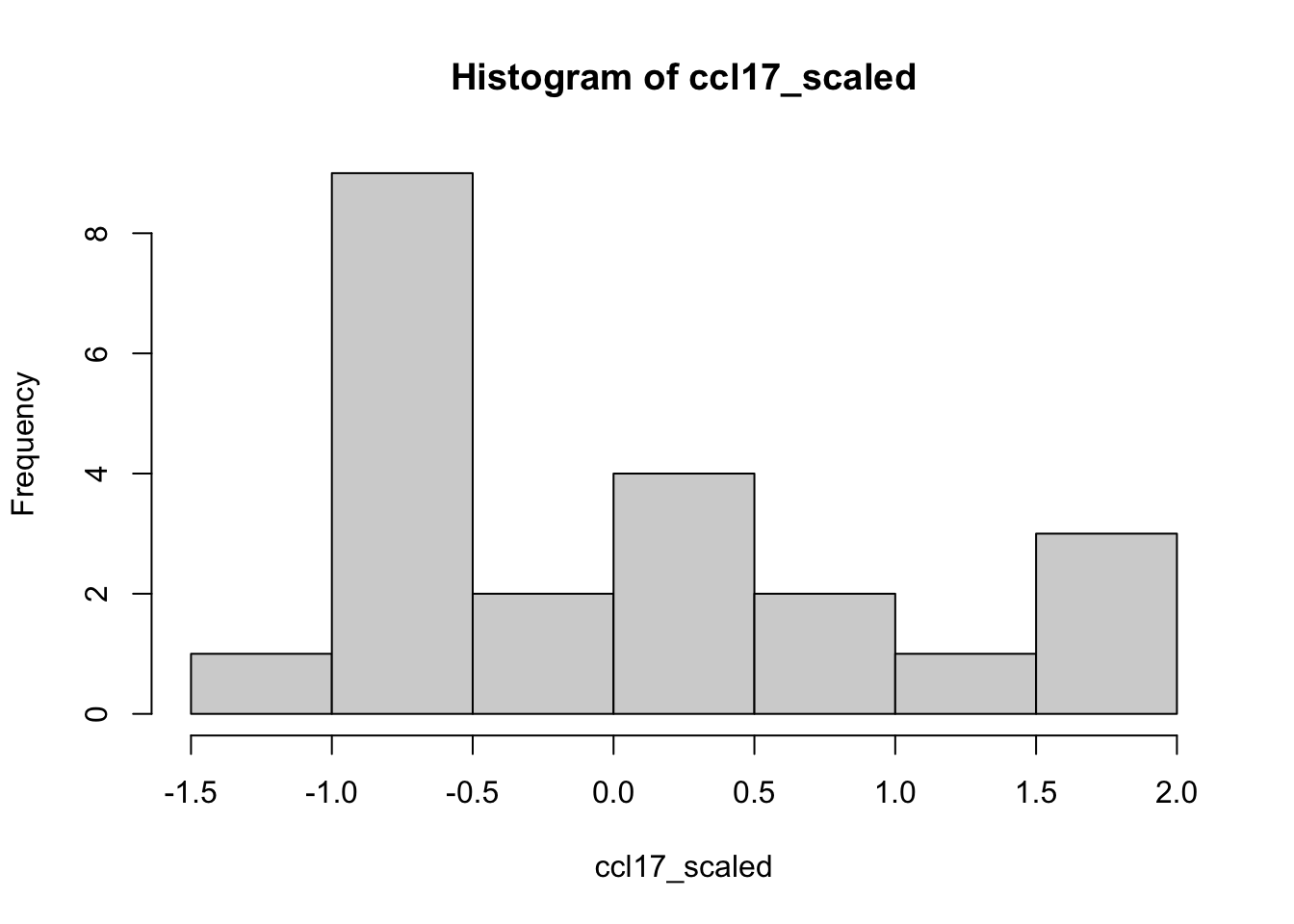
Try scaling the Ccl17 gene and compare the range and histogram to the example above. Are they similar or not?

ccl17_data <- gse_data["Ccl17" ,]
hist(ccl17_data, breaks=10)

ccl17_scaled <- scale(ccl17_data)
hist(ccl17_scaled, breaks=10)

The scaling parameter will scale the data within each row, or gene. Here is an example of the matrix output of the scaled data. In general, scale() works on rows, so we have to transpose our matrix using t() so that the columns become rows, and rows become columns, scale it, then transpose it back.

scaled_data <- t(scale(t(gse_data)))
head(scaled_data)
              GSM2545337 GSM2545338 GSM2545348 GSM2545353 GSM2545343 GSM2545349
Gm35287       -1.1036743 -1.0082057 -0.8490915 -0.4990401 -0.9127372 -0.7218001
Gm13562        0.3334096  1.2965928  0.5556826  1.2965928  1.3706838  0.7038646
A930006I01Rik  0.2711589  1.8619575  1.4642578 -0.1265408  2.6573568  0.6688585
Pla2g4e       -0.8435744 -0.8492559 -0.6759700 -0.6504032 -0.8947079 -0.6759700
Slc17a9       -0.9025259 -0.9371778 -0.6946142 -0.7292661 -0.6946142 -0.4867024
Gm29797        0.8669747  0.7053354  0.8669747  1.3518928  0.5167561 -0.1028614
              GSM2545354 GSM2545339 GSM2545344  GSM2545352 GSM2545362
Gm35287       -1.0400286 -1.1673200 -0.6899772  0.42382249 -0.3717487
Gm13562        1.4447748  0.5556826 -0.4815916  0.03704551 -0.7038646
A930006I01Rik  0.6688585  0.6688585 -0.5242404 -0.12654080 -0.1265408
Pla2g4e       -0.8009631 -0.8350521 -0.8265298 -0.01691539  0.3580639
Slc17a9       -0.6253103 -0.9371778 -0.6946142 -0.20948681  0.3449444
Gm29797        0.3012370  0.8939146  0.5436960  1.02861407 -0.2375609
              GSM2545340   GSM2545345 GSM2545350  GSM2545363 GSM2545336
Gm35287       -0.0216974  0.201062548 -0.8809143  0.01012545  1.6012679
Gm13562       -0.3334096  0.037045507  1.3706838  0.55568261 -1.0743197
A930006I01Rik  0.2711589 -0.921940099 -0.1265408 -0.52424045 -0.5242404
Pla2g4e       -0.2839461 -0.661766196 -0.6844922 -0.75835178  1.4403906
Slc17a9       -0.7985700 -0.590658298 -0.6599622 -0.17483486  0.9686796
Gm29797        0.2742971  0.004898162  1.1633135  0.97473429 -1.1535172
              GSM2545342 GSM2545351 GSM2545380 GSM2545341 GSM2545346 GSM2545347
Gm35287        1.2830394  0.7738738  2.2377249  0.7420510  1.1239252  0.8693424
Gm13562       -1.0002287 -1.2965928 -0.8520467 -1.2225017 -1.2965928 -1.2965928
A930006I01Rik -0.9219401 -0.9219401 -0.9219401 -0.9219401 -0.9219401 -0.9219401
Pla2g4e        0.9120107  1.0057555  1.2102897  2.4374947  0.7302025  1.3636903
Slc17a9        0.2063366  0.8300718  1.9735863  2.3201058  0.9686796  1.5231109
Gm29797       -1.3420965 -1.0457576 -1.1265773 -1.5845555 -1.5037358 -1.3959762

Why is this important? We actually are removing information when we’re plotting the heatmap. We are basically trying to make the data have the same mean (0) and the same range (from -3 to 3).

This is also why removing noisy genes is important for our analysis.

7.6 Distance Metric

At the heart of heatmaps is something called the distance, or dissimilarity matrix. For row based clustering, we compare two gene rows and calculate how dissimilar they are.

We’ll talk about two distance metrics: Euclidean and Correlation (Non parametric distance metrics are also potentially interesting, including rank-based (spearman’s) correlation).

  • Correlation-based distance basically compares the shape of two profiles, but ignores magnitude. It ranges from -1 (anticorrelated) to 1 (correlated)
  • Euclidean distance ignores shape, but considers magnitude. It ranges from 0 (identical) to infinity.

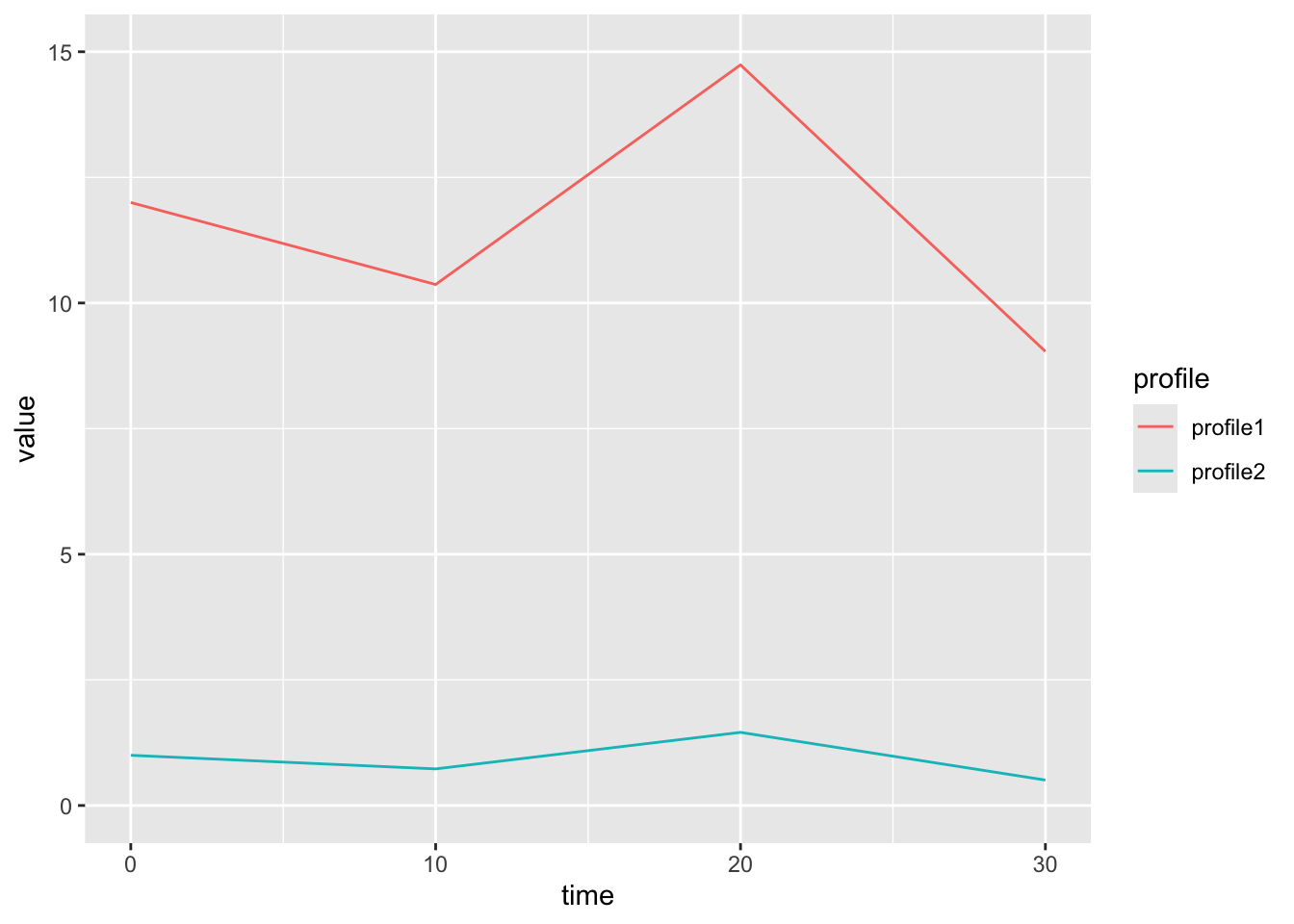
Here is an example of two genes that are similar in shape, but not magnitude. This will have a low correlation dissimilarity.

timeP <- c(0,10,20,30)
  exampleData <- data.frame(time=timeP, profile1 = (3 * (sin(timeP) + 1 + 3)),
                            profile2 = (0.5*sin(timeP)+1))
  
long_example <- exampleData |> tidyr::pivot_longer(-time, values_to = "value", names_to = "profile")

long_example |>
  ggplot(aes(x=time, y=value, group=profile, color=profile)) +
  geom_line() + ylim(c(0,15))

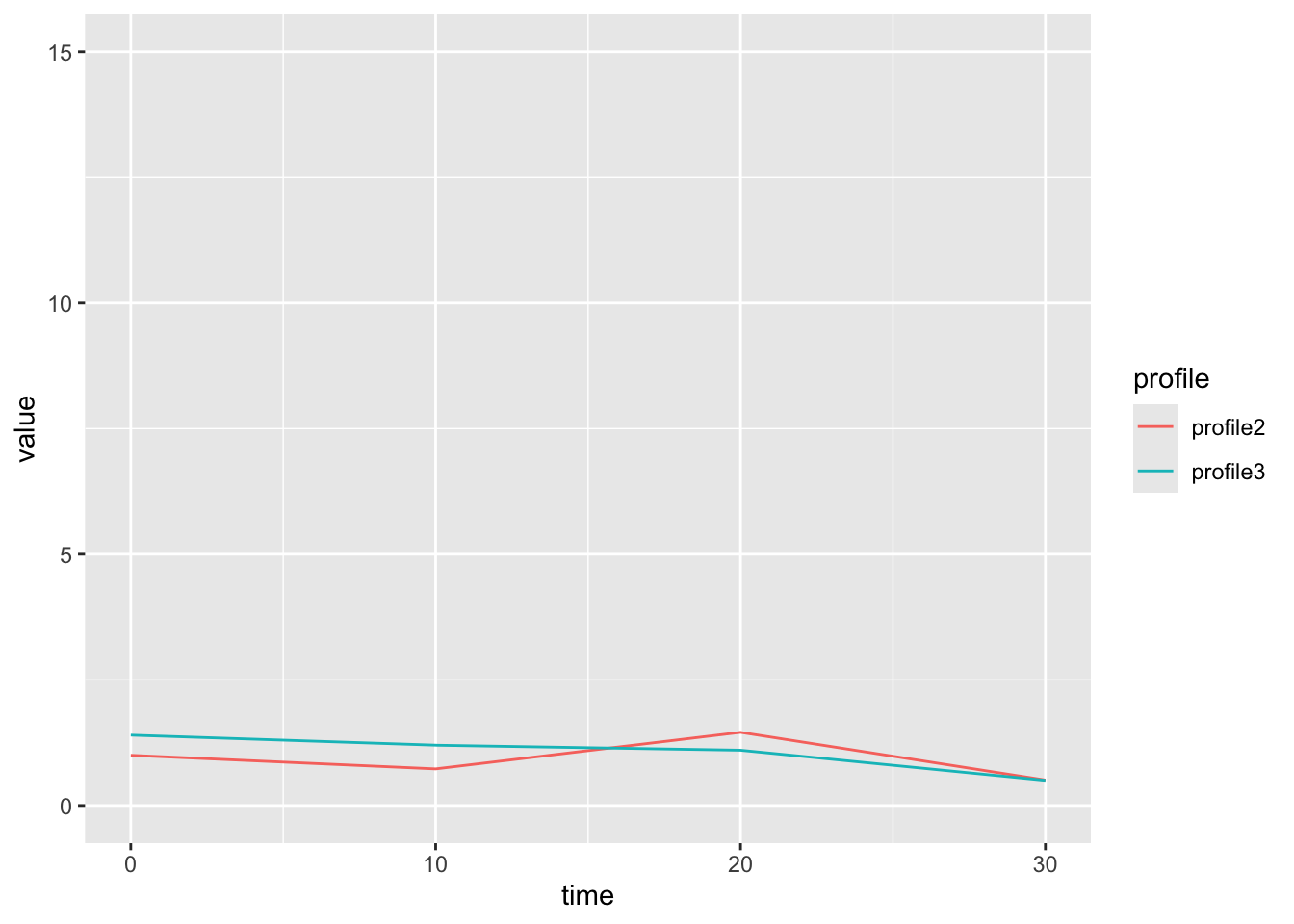
Here is an example of two profiles that are similar in magnitude, but not shape. These two profiles have a high euclidean similarity.

timeP <- c(0,10,20,30)
  exampleData2 <- data.frame(time=timeP, 
                            profile2 = (0.5*sin(timeP)+1),
                            profile3 = c(1.4, 1.2, 1.1, 0.5))
  
long_example2 <- exampleData2 |> tidyr::pivot_longer(-time, values_to = "value", names_to = "profile")

long_example2 |>
  ggplot(aes(x=time, y=value, group=profile, color=profile)) +
  geom_line() + ylim(c(0,15))

7.7 Distance Matrix

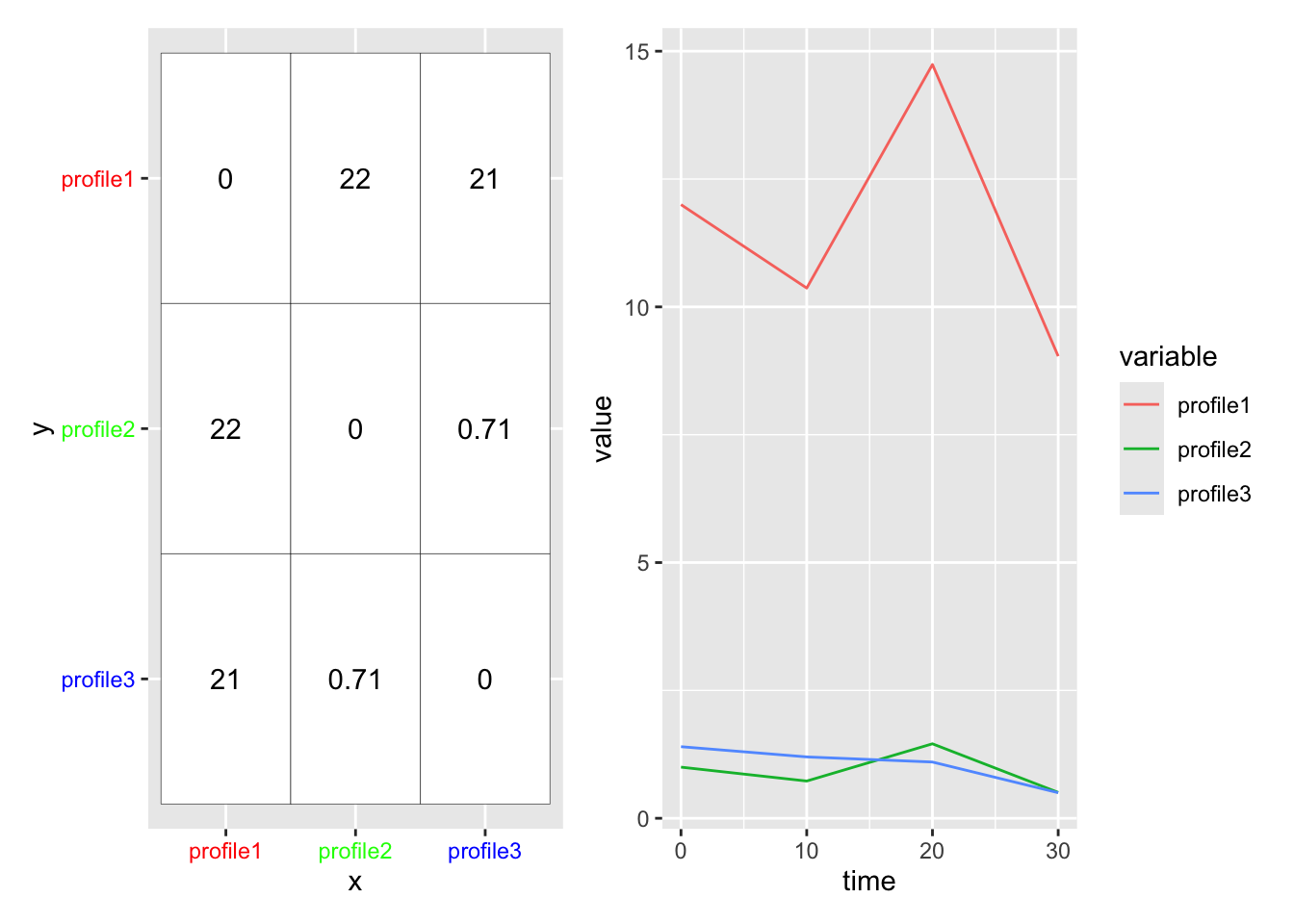
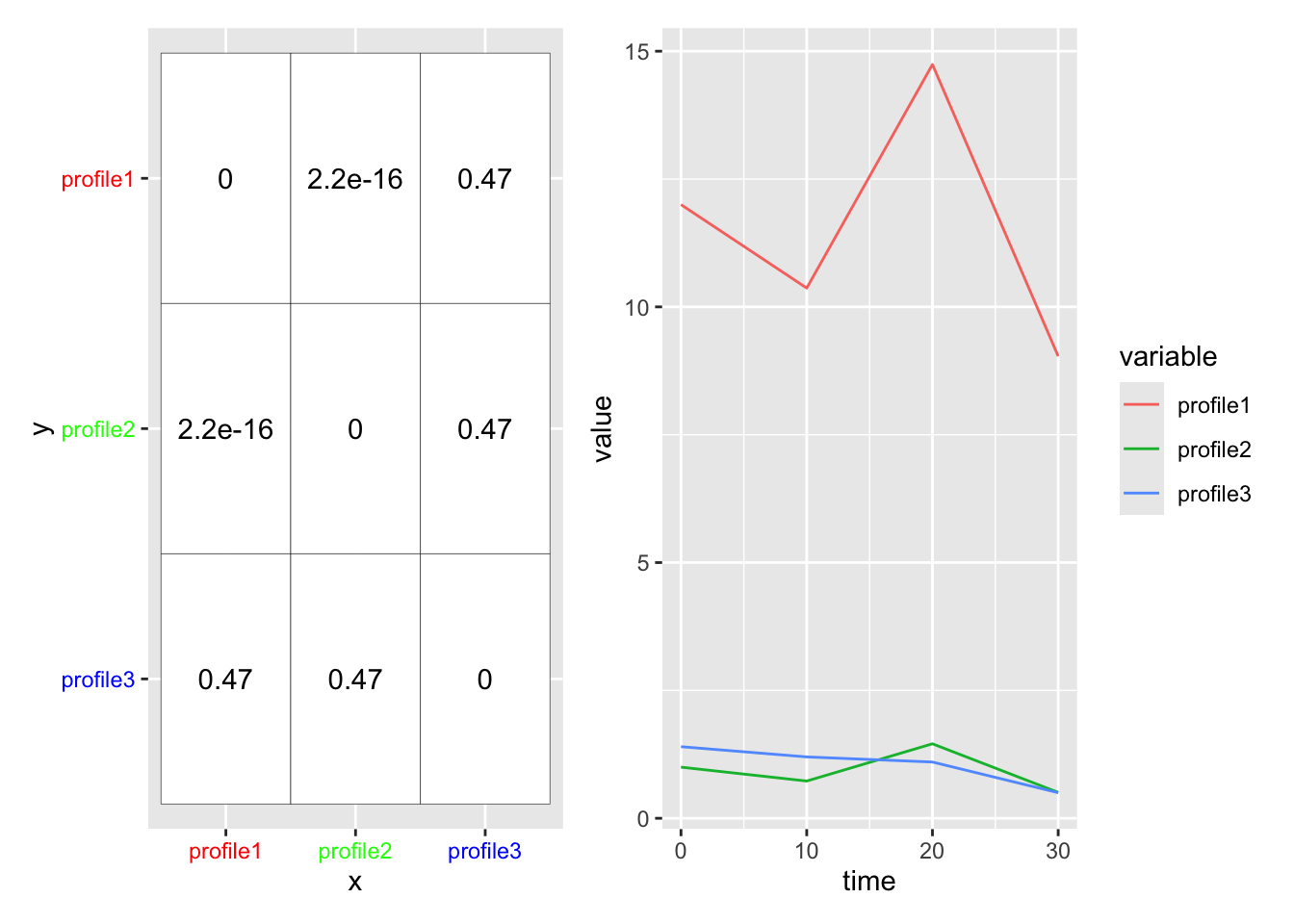
We use the distance metric to calculate a distance matrix, which gives a sense for how ‘close’ two profiles are in your data. The [ith,jth] entry in the distance matrix gives the distance between profile i and profile j in your data. (Note the distance matrix is symmetric about the diagonal, so [i,j] == [j,i], and that [i,i] == 0).

library(patchwork)
  timeP <- c(0,10,20,30)
  exampleData <- data.frame(time=timeP, profile1 = (3 * (sin(timeP) + 1 + 3)),
                            profile2 = (0.5*sin(timeP)+1),
                            profile3 = c(1.4, 1.2, 1.1, 0.5))
  exMelt <- exampleData |>
    tidyr::pivot_longer(-time, names_to = "variable", values_to = "value")

  #calculate the two different distance matrices
  eucMat <- as.matrix(dist(t(exampleData[,-1])))

  eucMatLong <- data.frame(x=rownames(eucMat), eucMat) |> pivot_longer(-x, names_to = "y", values_to = "value") |>
#    mutate()
    mutate(value = signif(value, digits = 2))
  
euclideanMat <-  eucMatLong |> mutate(y = fct_rev(factor(y))) |>
    ggplot() +
    aes(x=x, y=y) +
    geom_tile(fill="white", color="black") +
    geom_text(aes(label=value)) +
    theme(axis.text.y = element_text(color=c("blue", "green", "red")),
          axis.text.x= element_text(color=c("red", "green", "blue")))
Warning: Vectorized input to `element_text()` is not officially supported.
ℹ Results may be unexpected or may change in future versions of ggplot2.
Vectorized input to `element_text()` is not officially supported.
ℹ Results may be unexpected or may change in future versions of ggplot2.
profile_plot <-  exMelt |>
    ggplot() +
    aes(x=time, y=value, color=variable, group=variable) +
    geom_line()

euclideanMat + profile_plot

Here is the distance matrix for correlation. Note that profiles 1 and 2 are very similar (they have a low correlation value).

# define our correlation distance function
  corDist <- function(x) as.dist(1-cor(t(x)))

# apply it to our data (we correlate rows)
  corMat <- as.matrix(corDist(t(exampleData[,-1])))

  corMatLong <- data.frame(x=rownames(eucMat), corMat) |> pivot_longer(-x, names_to = "y", values_to = "value") |>
#    mutate()
    mutate(value = signif(value, digits = 2))
  
corMat <-  corMatLong |> mutate(y = fct_rev(factor(y))) |>
    ggplot() +
    aes(x=x, y=y) +
    geom_tile(fill="white", color="black") +
    geom_text(aes(label=value)) +
    theme(axis.text.y = element_text(color=c("blue", "green", "red")),
          axis.text.x= element_text(color=c("red", "green", "blue")))
Warning: Vectorized input to `element_text()` is not officially supported.
ℹ Results may be unexpected or may change in future versions of ggplot2.
Vectorized input to `element_text()` is not officially supported.
ℹ Results may be unexpected or may change in future versions of ggplot2.
profile_plot <-  exMelt |>
    ggplot() +
    aes(x=time, y=value, color=variable, group=variable) +
    geom_line()

corMat + profile_plot

The distance matrix is how we decide which rows group together. We’ll run through an example below.

7.7.1 Euclidean versus Correlation Distance

Here’s the correlation version of the heatmap again.

pheatmap(gse_data, 
         cluster_rows = TRUE, cluster_cols = FALSE, 
         #clustering_distance_cols = 'correlation',
         clustering_distance_rows = 'correlation',
         scale="row")

Let’s compare it to the heatmap using euclidean distance:

pheatmap(gse_data, 
         cluster_rows = TRUE, cluster_cols = FALSE, 
         clustering_distance_rows = 'euclidean',
         scale="none")

Without scaling, we see that we have 3 clusters.

Let’s look at our data using euclidean distance with row scaling:

pheatmap(gse_data, 
         cluster_rows = TRUE, cluster_cols = FALSE, 
         clustering_distance_rows = 'euclidean',
         scale="row")

In this case, our two clusterings look fairly similar if we use row scaling. But this is not always the case.

7.8 Intro to Hierarchical Clustering

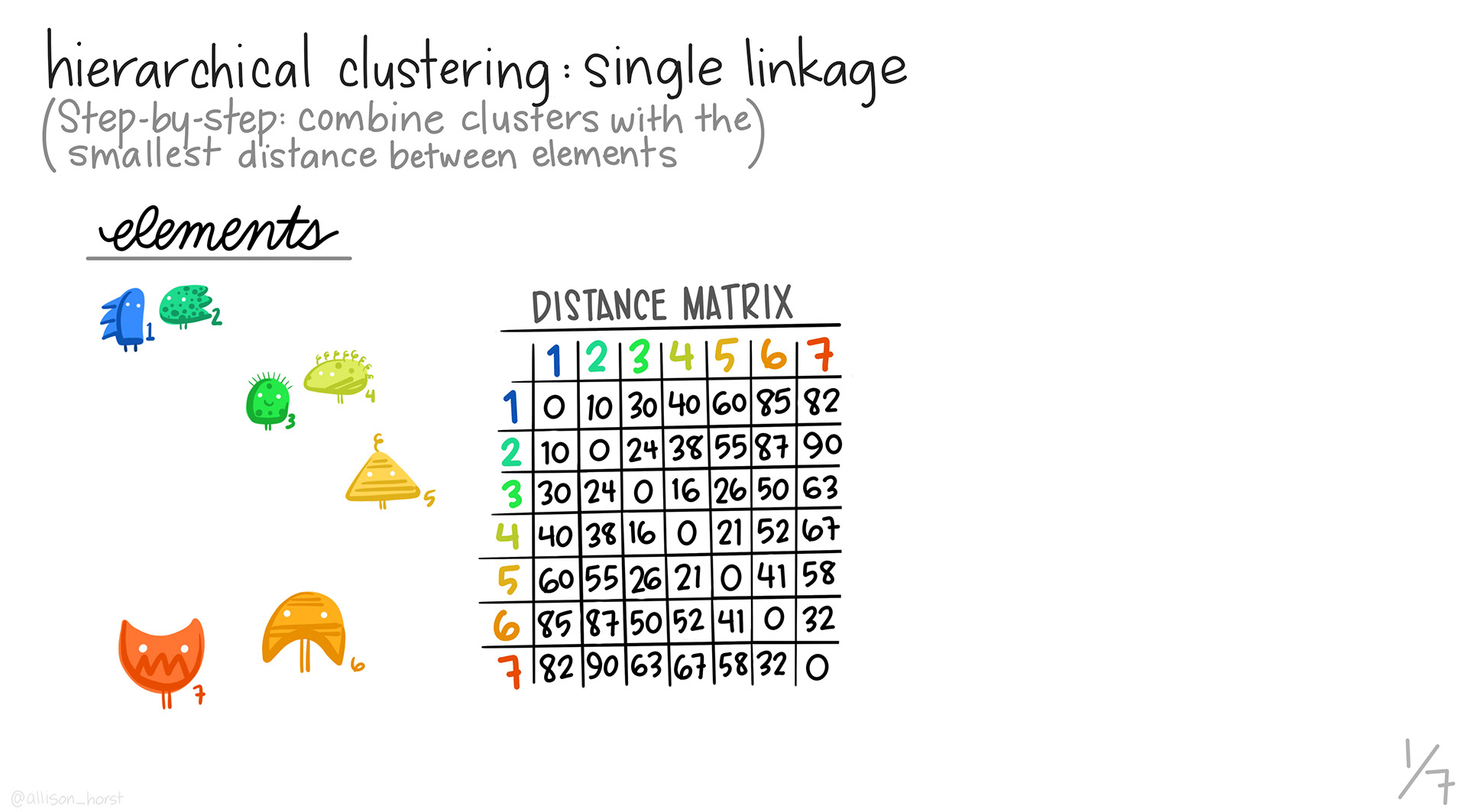
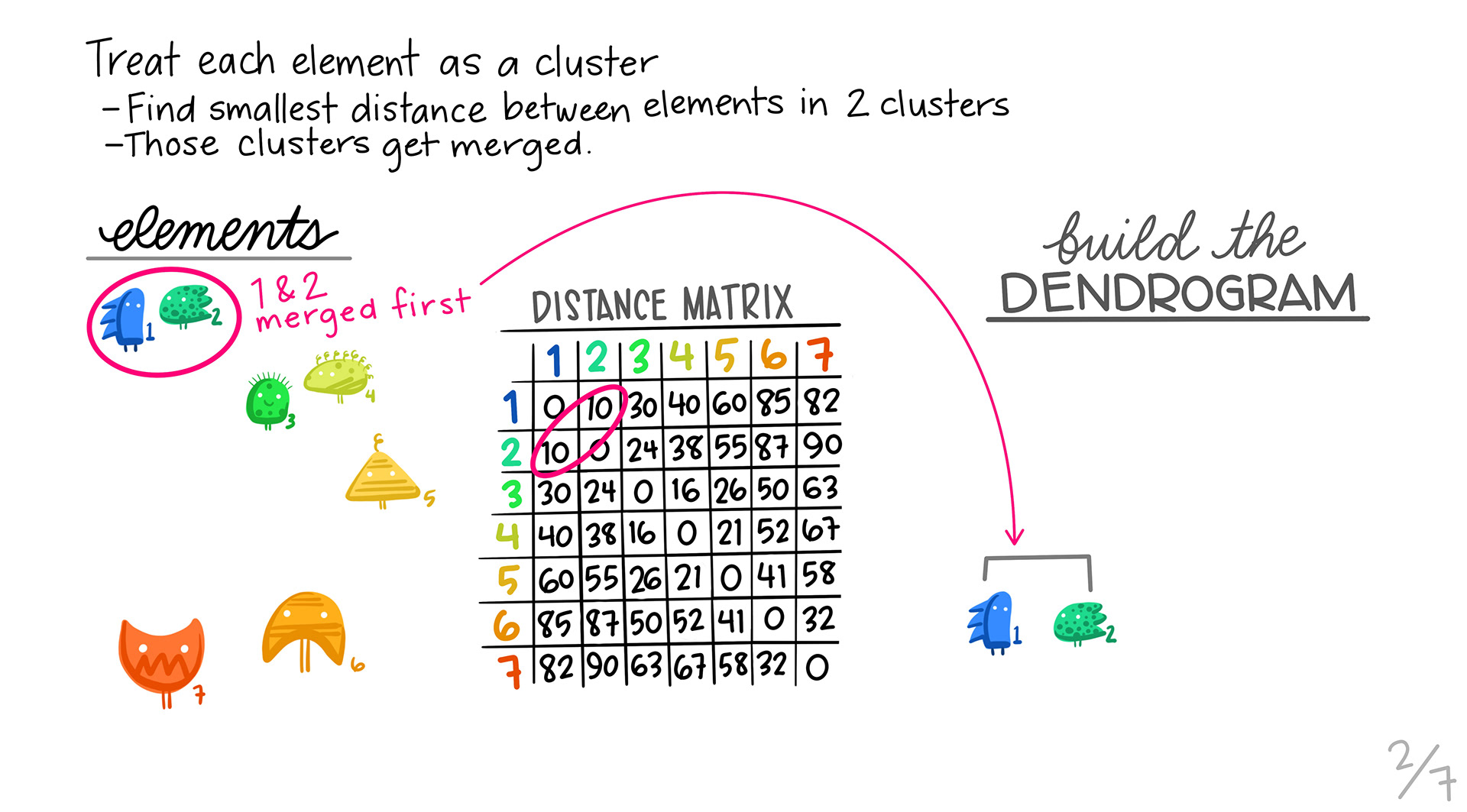
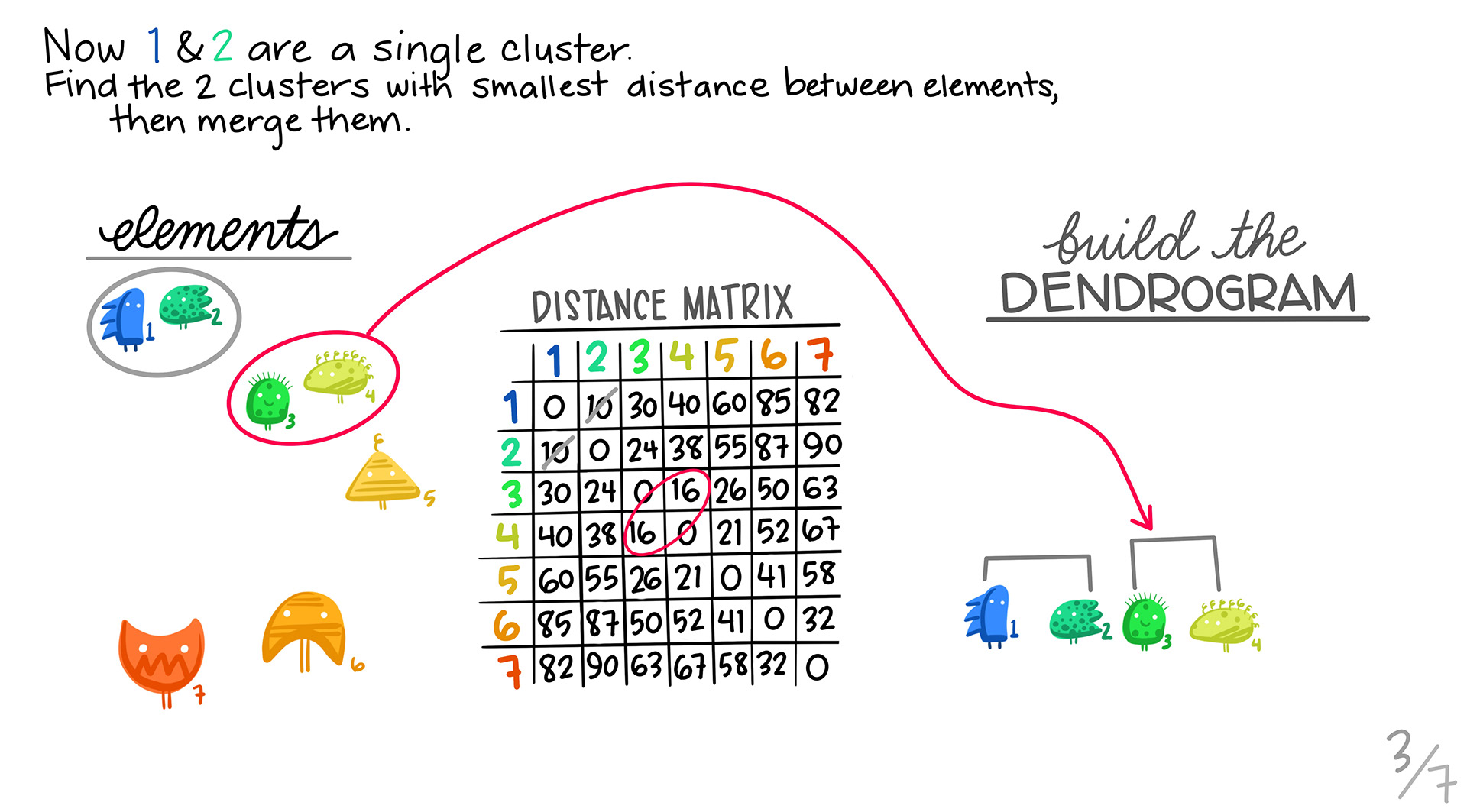
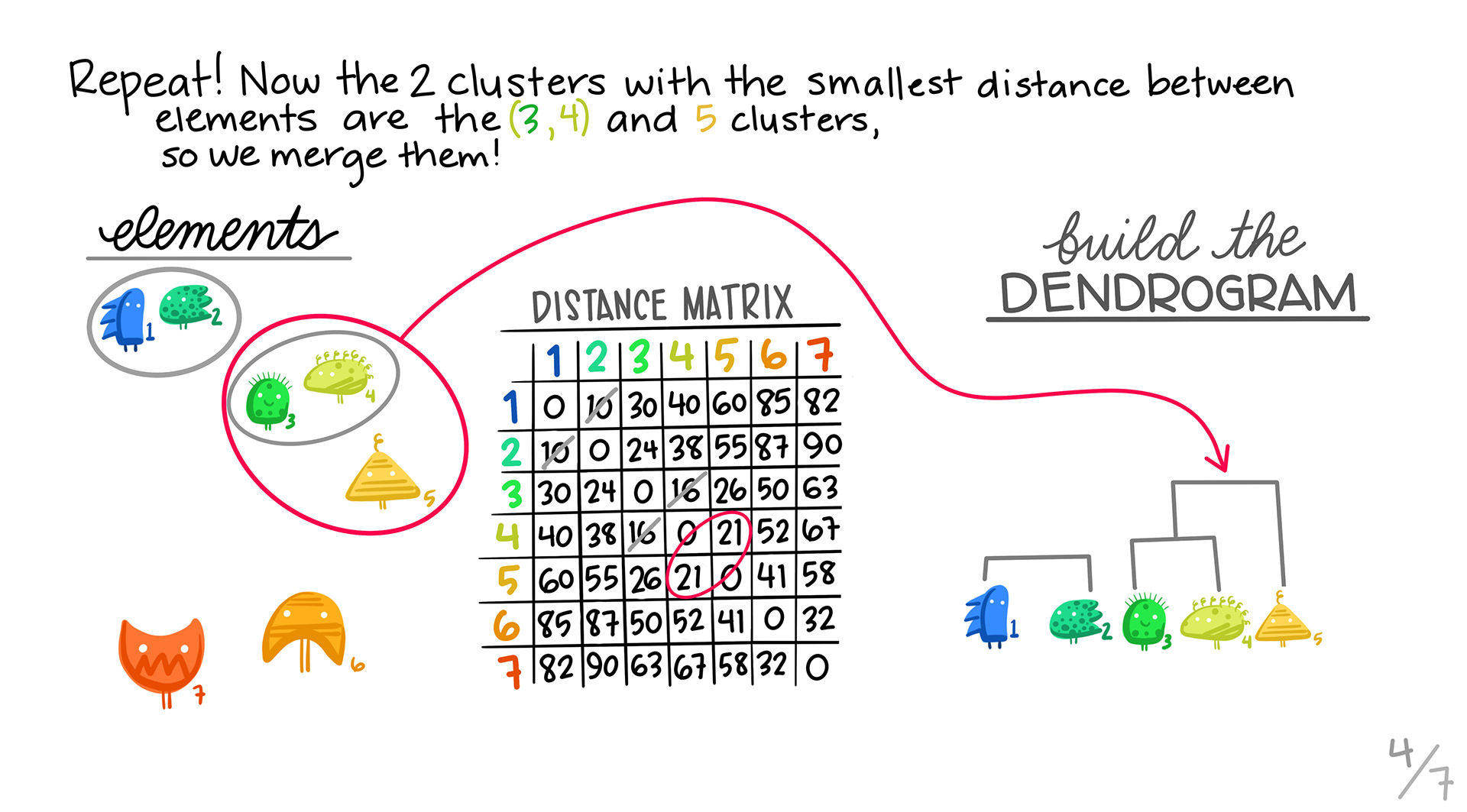
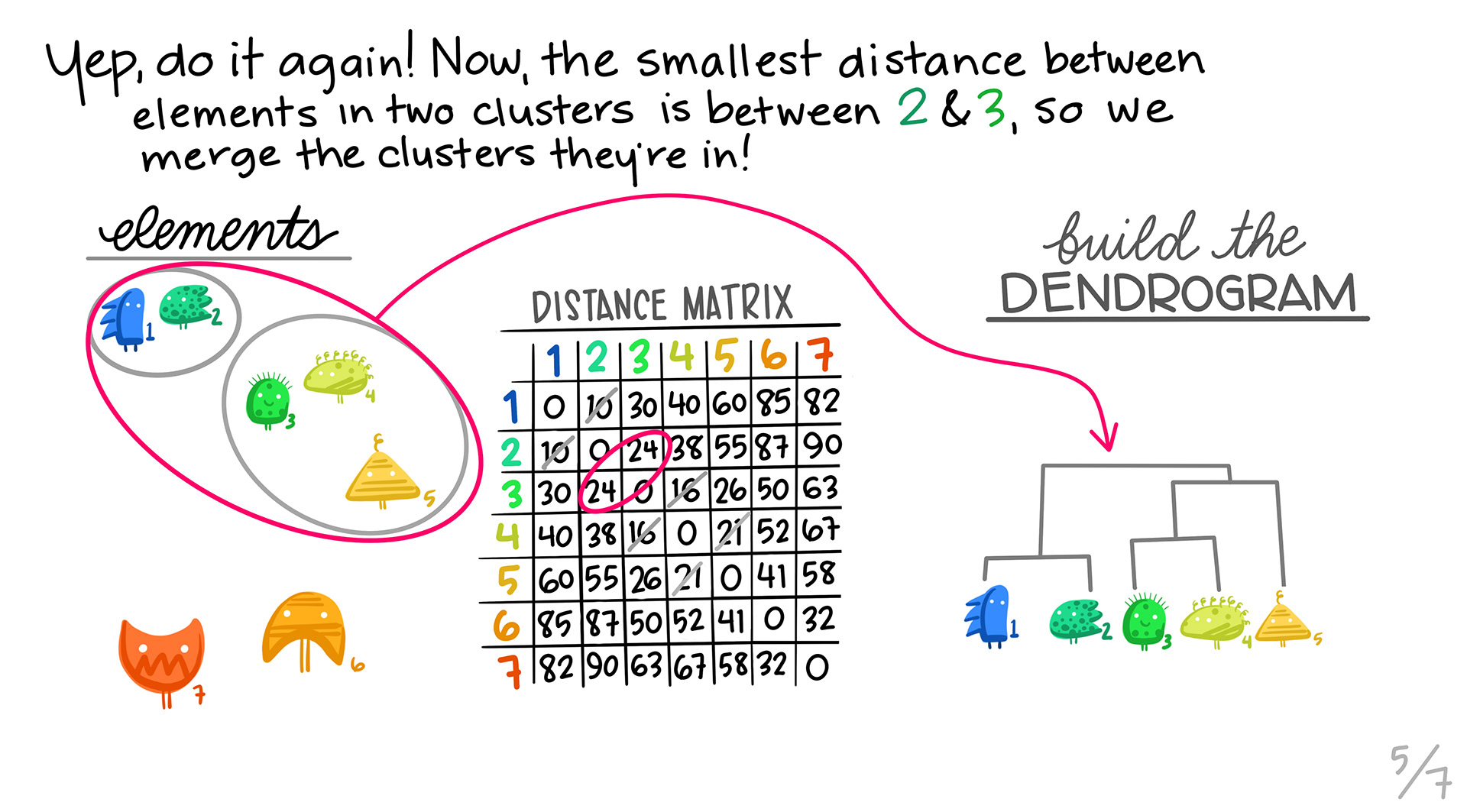
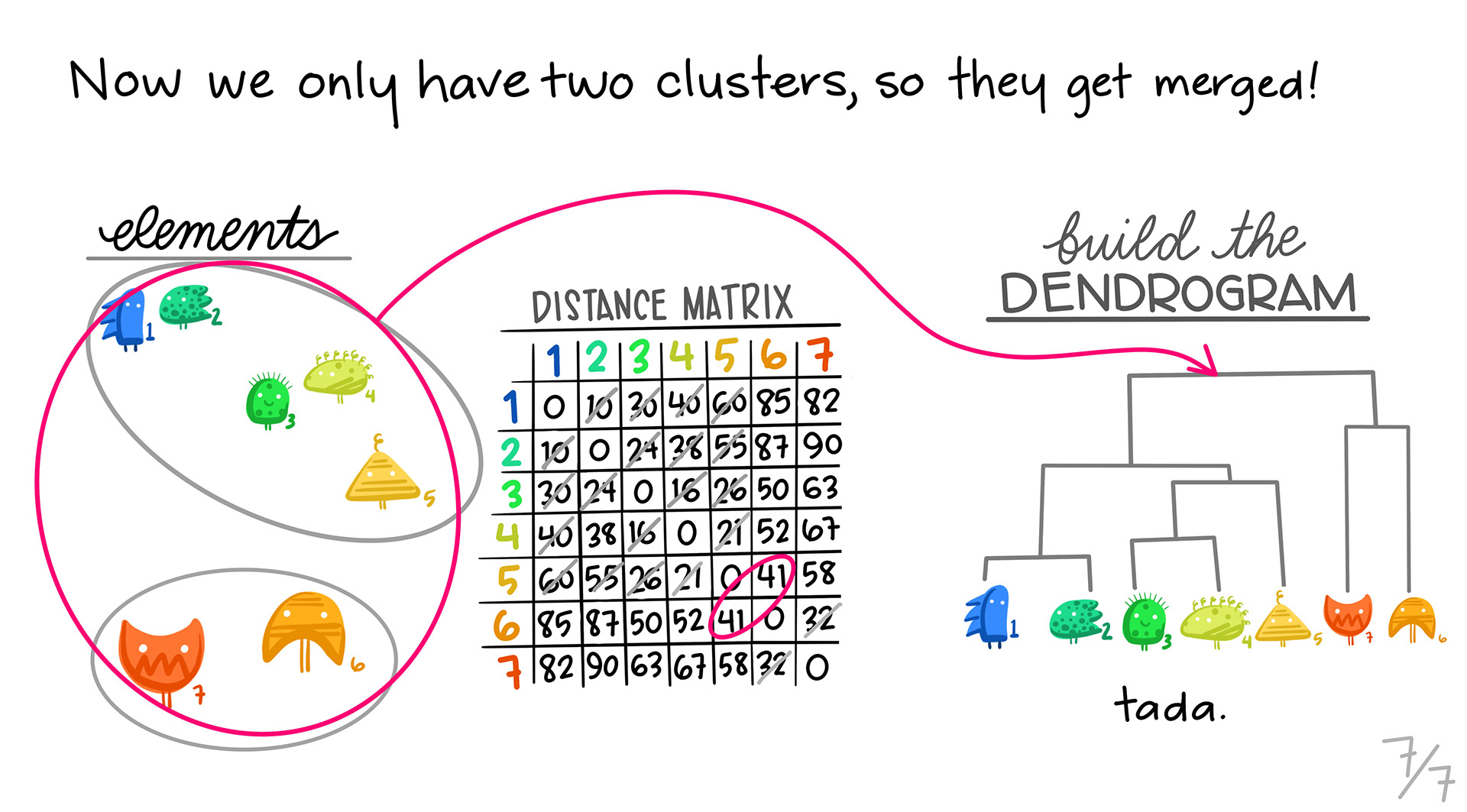
In hierarchical clustering, we are grouping similar profiles together into clusters. The type of clustering we’ll look at is called agglomerative, or bottom up clustering. Agglomerative clustering starts out at the individual level and slowly builds up. All slides are from Allison Horst.

  1. We start with the distance matrix for our data.

  1. We first take the pair of profiles that are the most similar using our distance metric, and then make them into a single profile by aggregating. Those two profiles are removed, and the new profile is calculated. Note that the dimensions of our distance matrix gets smaller with each merge, until we are left with only a few values.

  1. We find the next pair of genes that are most similar, and then pair them up into a cluster.

  1. We repeat steps 2 and 3. In this case, it turns out that one of the 2 member clusters is the most similar to the the orange triangle.

5. Repeating:

  1. We continue, until we combine all of the clusters into one.

The one drawback to these slides is that they don’t show the distance matrix shrinking as we cluster profiles together. Every cluster gets combined into a single column/row in our distance matrix as we go down the line.

7.9 Interpreting the Tree

The trees are important to understand. They will give you a idea of how strong the clusters are in the data.

Ideally, you want a tree with some depth, and with balanced clusters. Again, having noisy data will affect this.

7.10 Cutting the Tree

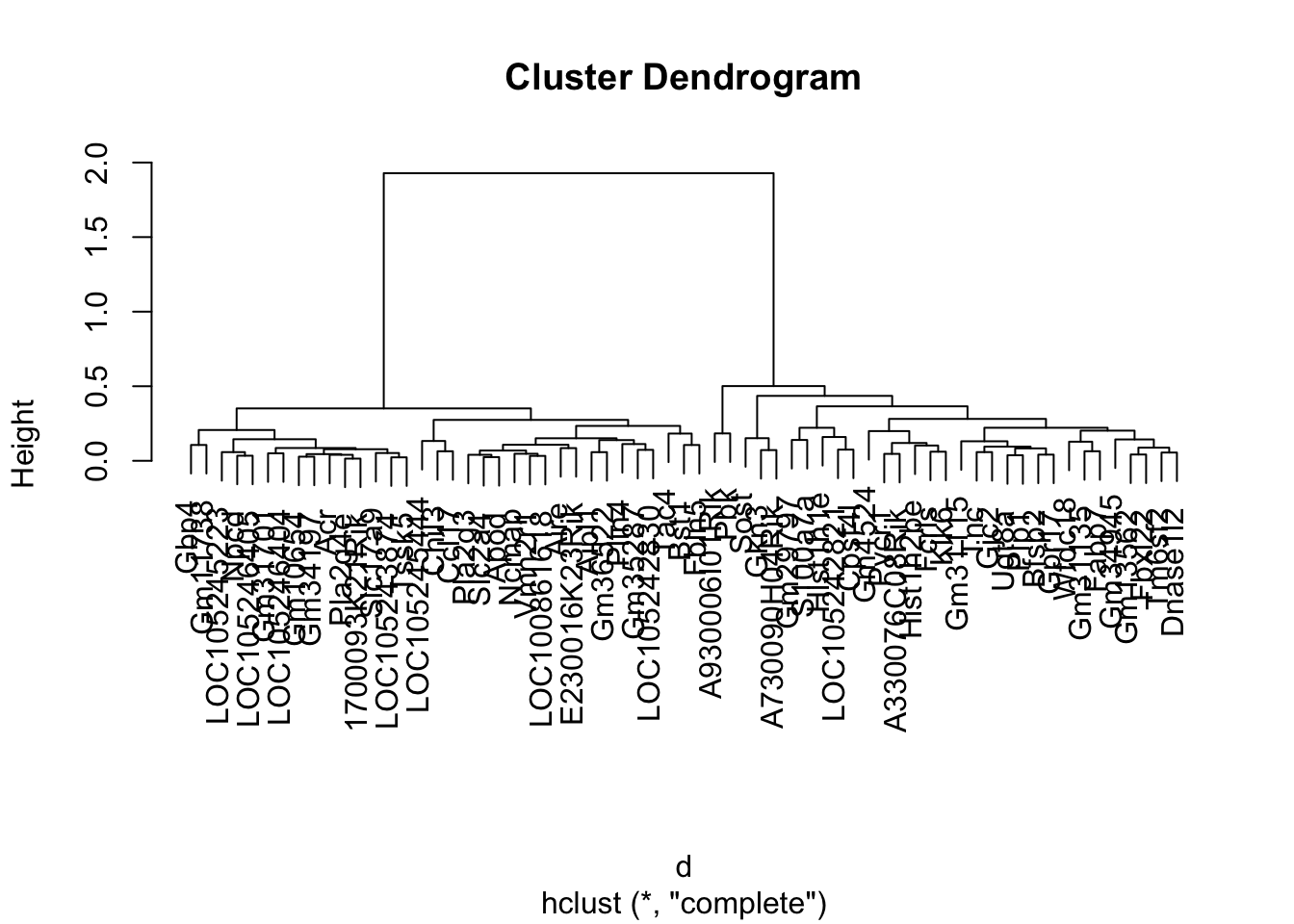
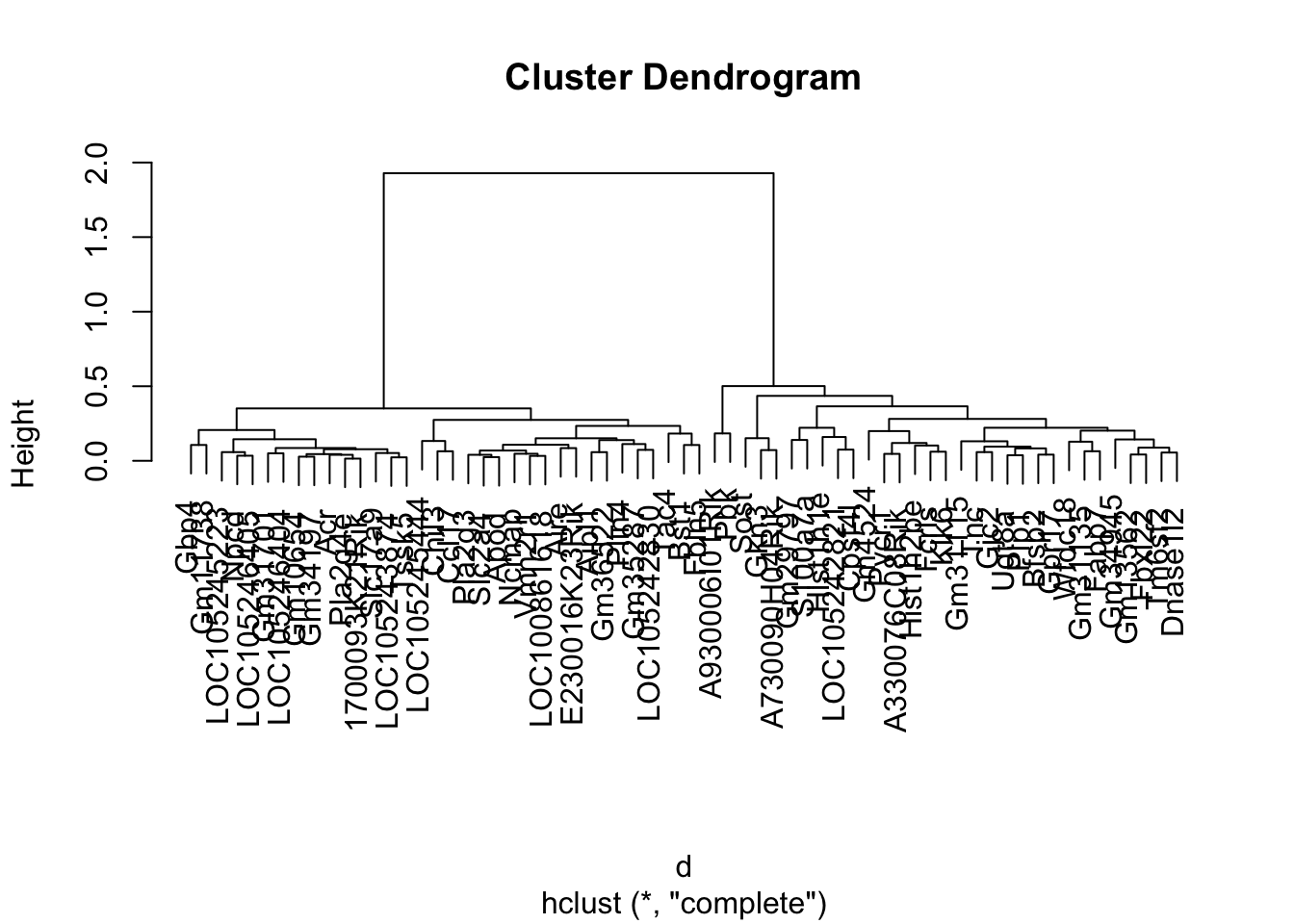
When we use a hierarchical algorithm, we need to cut the tree into clusters. We tend to do this by cutting the tree at a specific height.

row_tree <- cluster_rows$tree_row

plot(row_tree)

cutree() will attempt to cut a tree at a height based on the number of clusters you give it, but it’s not a guaranteed output if that number doesn’t exist at some level in the tree.

We have two choices: we can specify a desired number of clusters (k), and cutree() will attempt to cut the tree at a height that gives us this number:

clusters <- cutree(row_tree, k = 2)
clusters
      Gm35287       Gm13562 A930006I01Rik       Pla2g4e       Slc17a9 
            1             2             2             1             1 
      Gm29797        Vmn2r1         Fcrls       S100a7a         Chil3 
            2             1             2             2             1 
        Ugt8a  LOC100861618           Tnc       Gm31115         Ncmap 
            2             1             2             2             1 
         Bst1          Gbp4          Gkn3  LOC105242821          Klk6 
            1             1             2             2             2 
      Gm31135        Tm6sf2       Gm10654         Ccl17       Gm34197 
            2             2             1             1             1 
       Fbxl22       Gm31701         Bfsp2       Gm34945         Fabp7 
            2             1             2             2             2 
         Aire  LOC105245223        Pla2g3  LOC105243874 1700093K21Rik 
            1             1             1             1             1 
         Gjc2        Slc2a4         Aipl1  LOC105242830 E230016K23Rik 
            2             1             1             1             1 
       Wfdc18 A730090H04Rik          Tac4          Sost        Cpsf4l 
            2             2             1             2             2 
      Gm11738         Pycr1         Fbln5  LOC105245444     Hist1h2be 
            1             2             1             1             2 
     Hist1h1e A330076C08Rik           Pbk         Tssk5          Npcd 
            2             2             2             1             1 
          Acr        Gm4524          Apod      Dnase1l2         Plin4 
            1             2             1             2             1 
        Gpr17  LOC105246404  LOC105246405       Gm36522          Plp1 
            2             1             1             1             2 

Or, we can try to pick a height to cut the tree at. If we cut at height = 1, then we also get 2 clusters.

clusters2 <- cutree(row_tree, h = 1)
clusters2
      Gm35287       Gm13562 A930006I01Rik       Pla2g4e       Slc17a9 
            1             2             2             1             1 
      Gm29797        Vmn2r1         Fcrls       S100a7a         Chil3 
            2             1             2             2             1 
        Ugt8a  LOC100861618           Tnc       Gm31115         Ncmap 
            2             1             2             2             1 
         Bst1          Gbp4          Gkn3  LOC105242821          Klk6 
            1             1             2             2             2 
      Gm31135        Tm6sf2       Gm10654         Ccl17       Gm34197 
            2             2             1             1             1 
       Fbxl22       Gm31701         Bfsp2       Gm34945         Fabp7 
            2             1             2             2             2 
         Aire  LOC105245223        Pla2g3  LOC105243874 1700093K21Rik 
            1             1             1             1             1 
         Gjc2        Slc2a4         Aipl1  LOC105242830 E230016K23Rik 
            2             1             1             1             1 
       Wfdc18 A730090H04Rik          Tac4          Sost        Cpsf4l 
            2             2             1             2             2 
      Gm11738         Pycr1         Fbln5  LOC105245444     Hist1h2be 
            1             2             1             1             2 
     Hist1h1e A330076C08Rik           Pbk         Tssk5          Npcd 
            2             2             2             1             1 
          Acr        Gm4524          Apod      Dnase1l2         Plin4 
            1             2             1             2             1 
        Gpr17  LOC105246404  LOC105246405       Gm36522          Plp1 
            2             1             1             1             2 

Now that we have the cluster assignments, we can plot our clusters as line plots.

Cutting Clusters in pheatmap

We can actually cut the clusters in pheatmap as well by supplying a cutree_rows (for row clusters) or a cutree_cols (for column clusters):

pheatmap(gse_data, 
         cluster_rows = TRUE, cluster_cols = FALSE, 
         clustering_distance_rows = 'correlation',
         scale="row",
         cutree_rows = 2)

7.11 Plotting each cluster

We can add these cluster assignments to our orignal gse_data in order to plot the clusters separately. I like to do this because it can actually highlight patterns in our clusters that are not obvious.

gse_clusters <- data.frame(gene=rownames(gse_data), clusters, gse_data)

head(gse_clusters)

We’ll need to make this data frame long using pivot_longer():

gse_cluster_long <- 
  gse_clusters |>
  pivot_longer(-c(gene,clusters), names_to = "sample", values_to = "value") |>
  mutate(clusters=factor(clusters))

head(gse_cluster_long)

We’ll extract time and geo_accession using colData()

time_frame <- colData(gse_model) |>
  as.data.frame() |>
  select(geo_accession, time)

head(time_frame)

Then we can merge it with our long data frame.

# join cluster annotations to the long data frame
gse_cluster_time <- gse_cluster_long |>
  inner_join(y=time_frame, by=c("sample"="geo_accession")) |>
  mutate(sample = factor(sample, levels = colnames(gse_data))) |>
  mutate(clusters = factor(clusters))

gse_cluster_time

Finally, we can plot our traces by cluster.

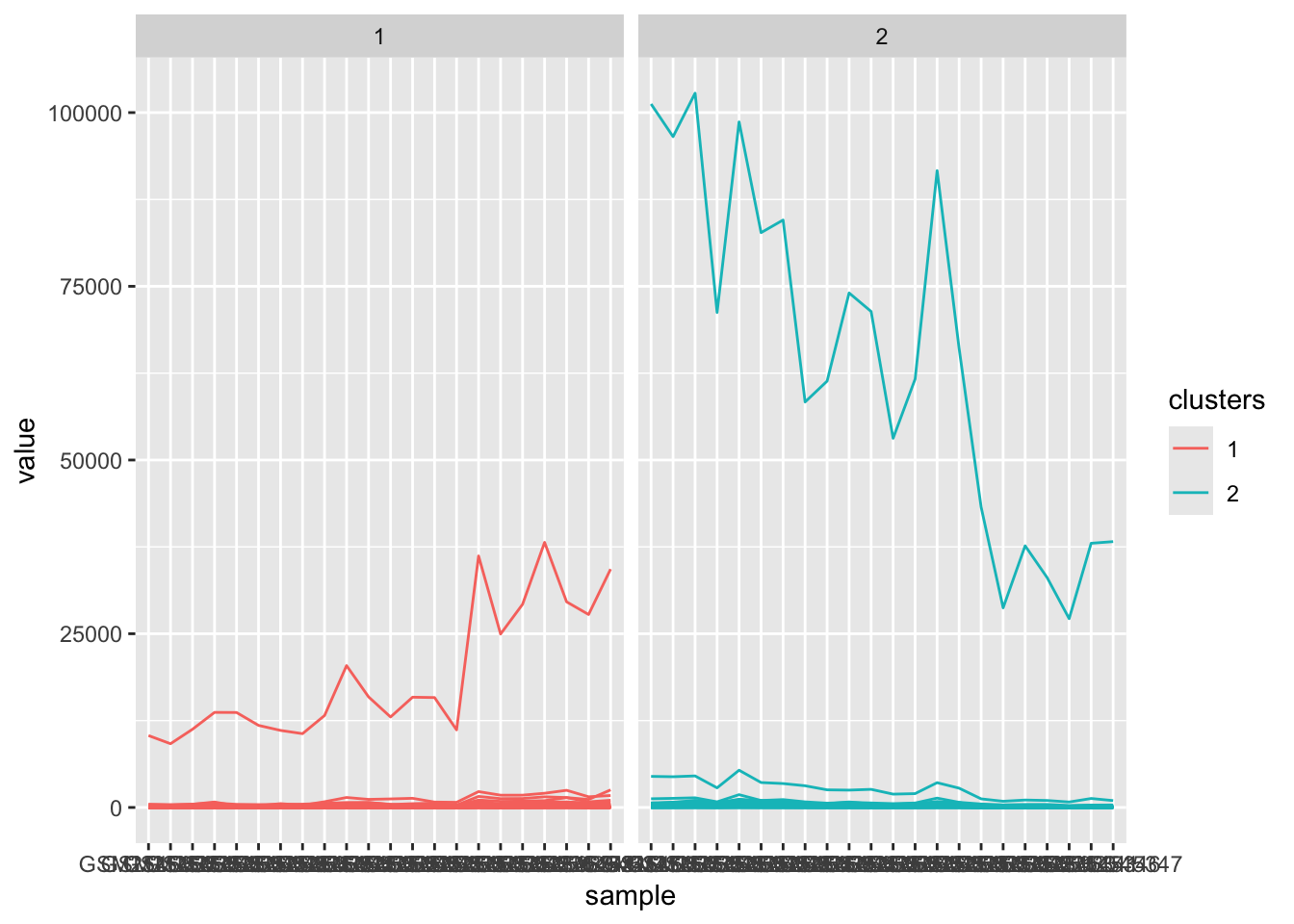
gse_cluster_time |>
  ggplot() +
  aes(x=sample, y=value, color=clusters, group=gene) +
  geom_line() +
  facet_wrap(~clusters) 

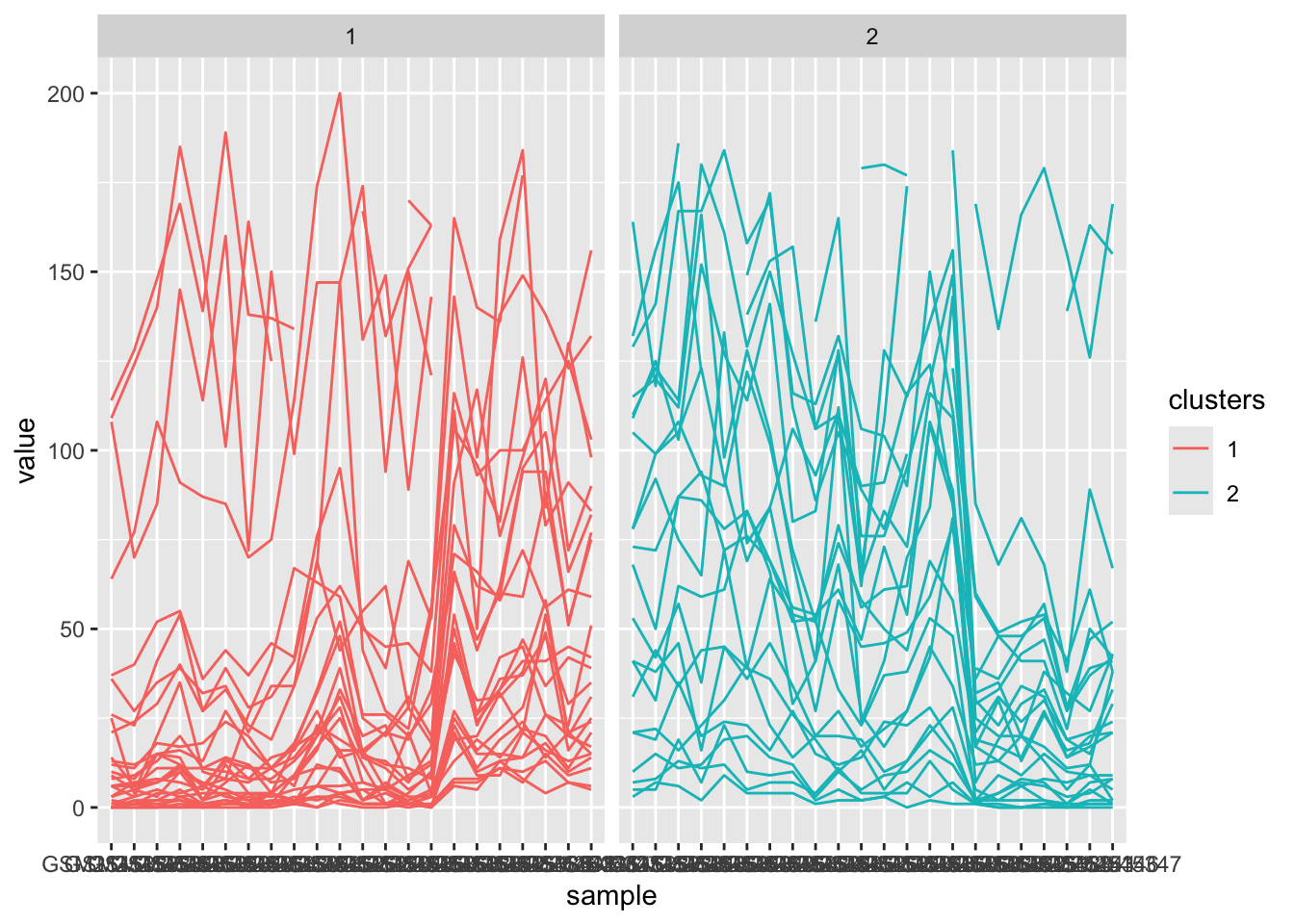
Our clusters are dominated by the high expression candidates. If we change the y-range, we can get a better idea of the expression patterns:

gse_cluster_time |>
  ggplot() +
  aes(x=sample, y=value, color=clusters, group=gene) +
  geom_line() +
  facet_wrap(~clusters) +
  ylim(c(0, 200))
Warning: Removed 306 rows containing missing values or values outside the scale range
(`geom_line()`).

We can see the general profile of the data for a large number of genes.

7.12 Other Clustering Methods

pheatmap() also allows us to use a clustering method known as kmeans, which is a partitional clustering algorithm.

kmeans works very differently than hierarchical clustering, in that you need to specify a number of clusters beforehand.

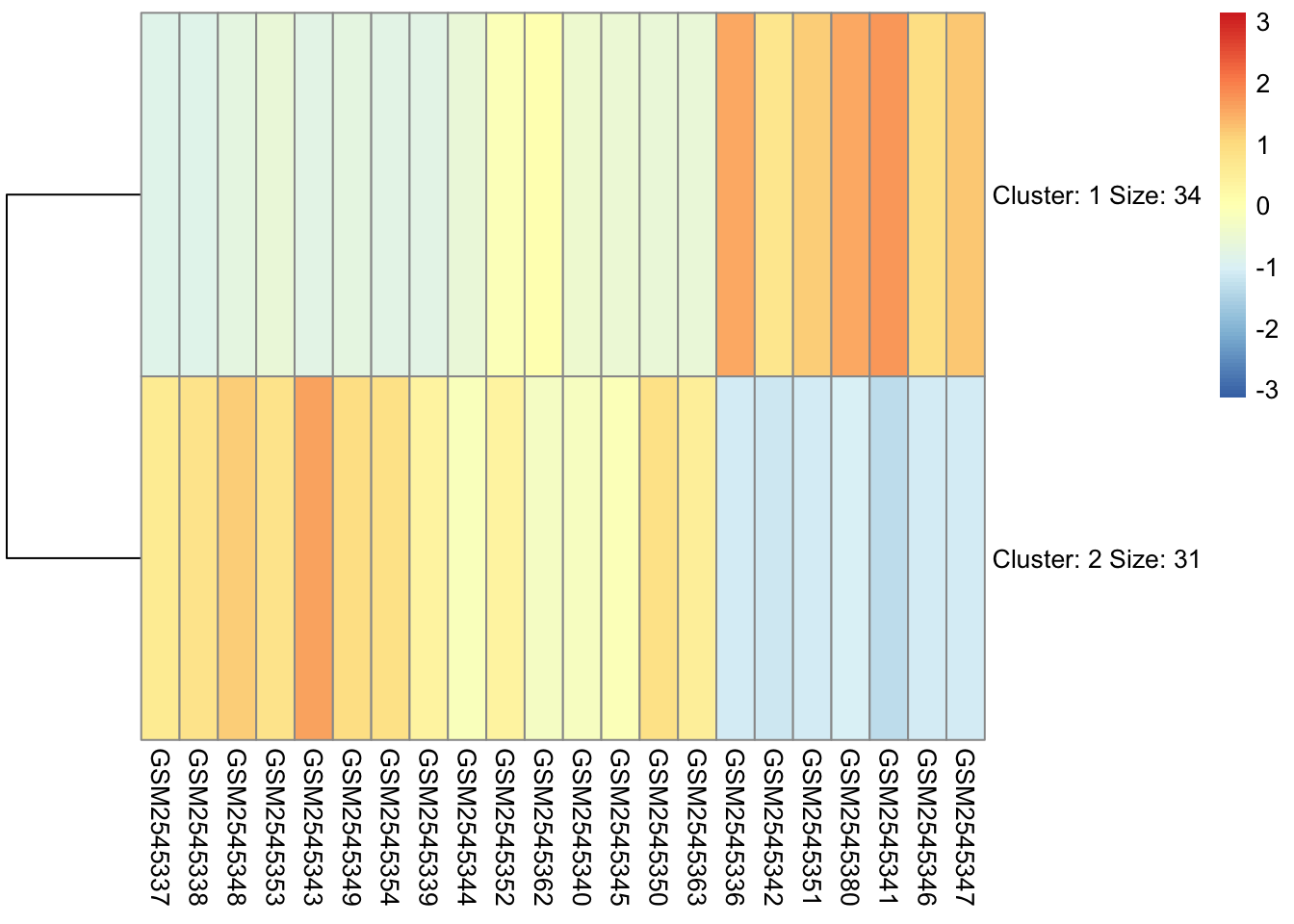
The output heatmap from kmeans is different than for hierarchical clustering.

pheatmap(gse_data, 
         cluster_rows = TRUE, cluster_cols = FALSE, 
         #clustering_distance_cols = 'correlation',
         clustering_distance_rows = 'correlation',
         scale="row",
         kmeans_k = 2
)

Which Method is Best?

My approach with clustering is to try and compare the clusters from mutliple methods. I try to find consensus clusters by trying to see what genes are in common across the different methods.
I don’t have time to show this, but I do have a paper about it here: https://pubmed.ncbi.nlm.nih.gov/17411399/

7.13 Annotations

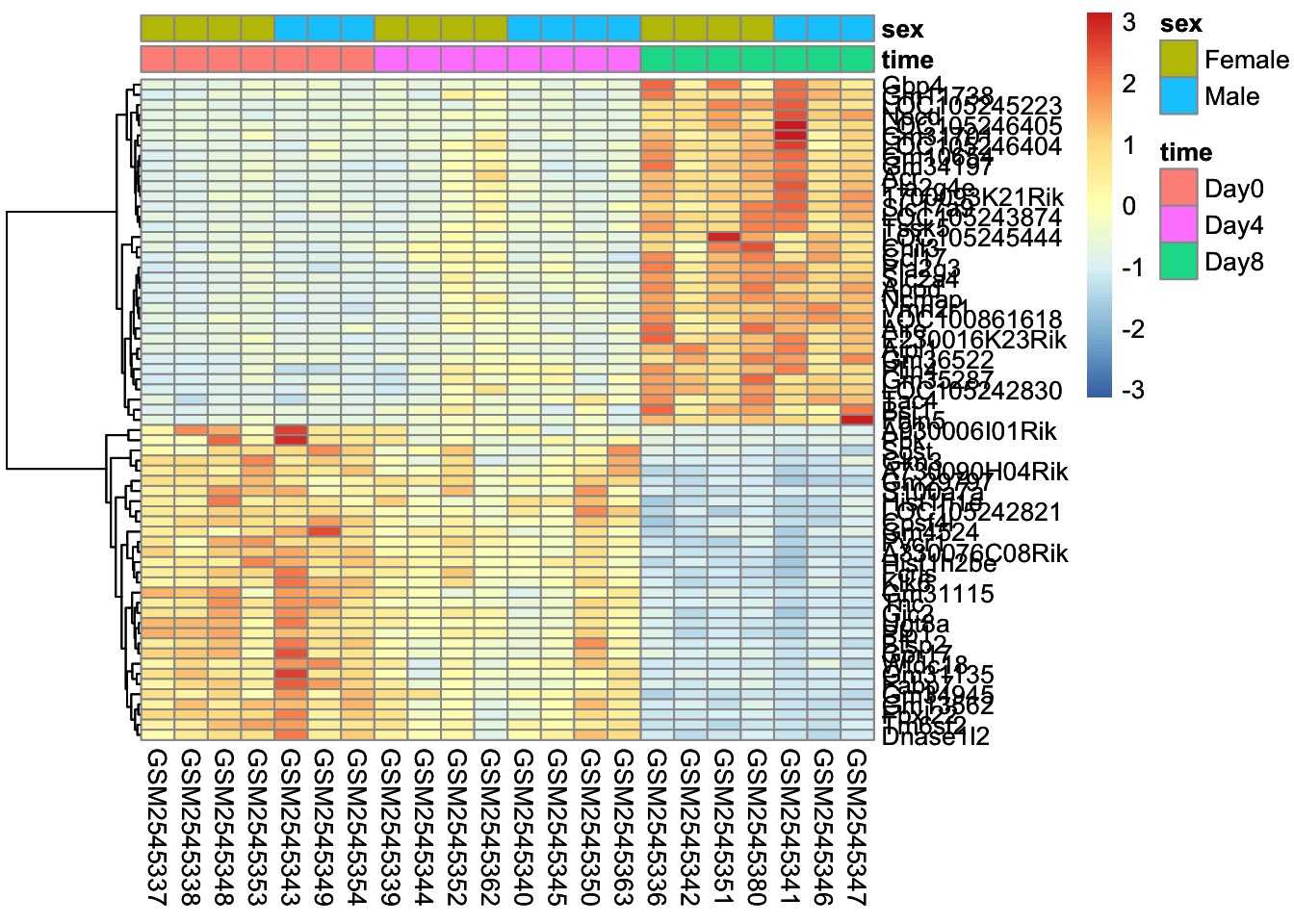
We can pull our colData and use them as annotations to the dataset:

col_annotations <- colData(gse_model) |> as.data.frame()

col_sex_time <- col_annotations |> select(time, sex)

cluster_rows <- pheatmap(gse_data, 
         cluster_rows = T, cluster_cols = F, 
         clustering_distance_rows = 'correlation',
         annotation_col = col_sex_time,
         scale="row")

cluster_rows

7.14 Color Palettes

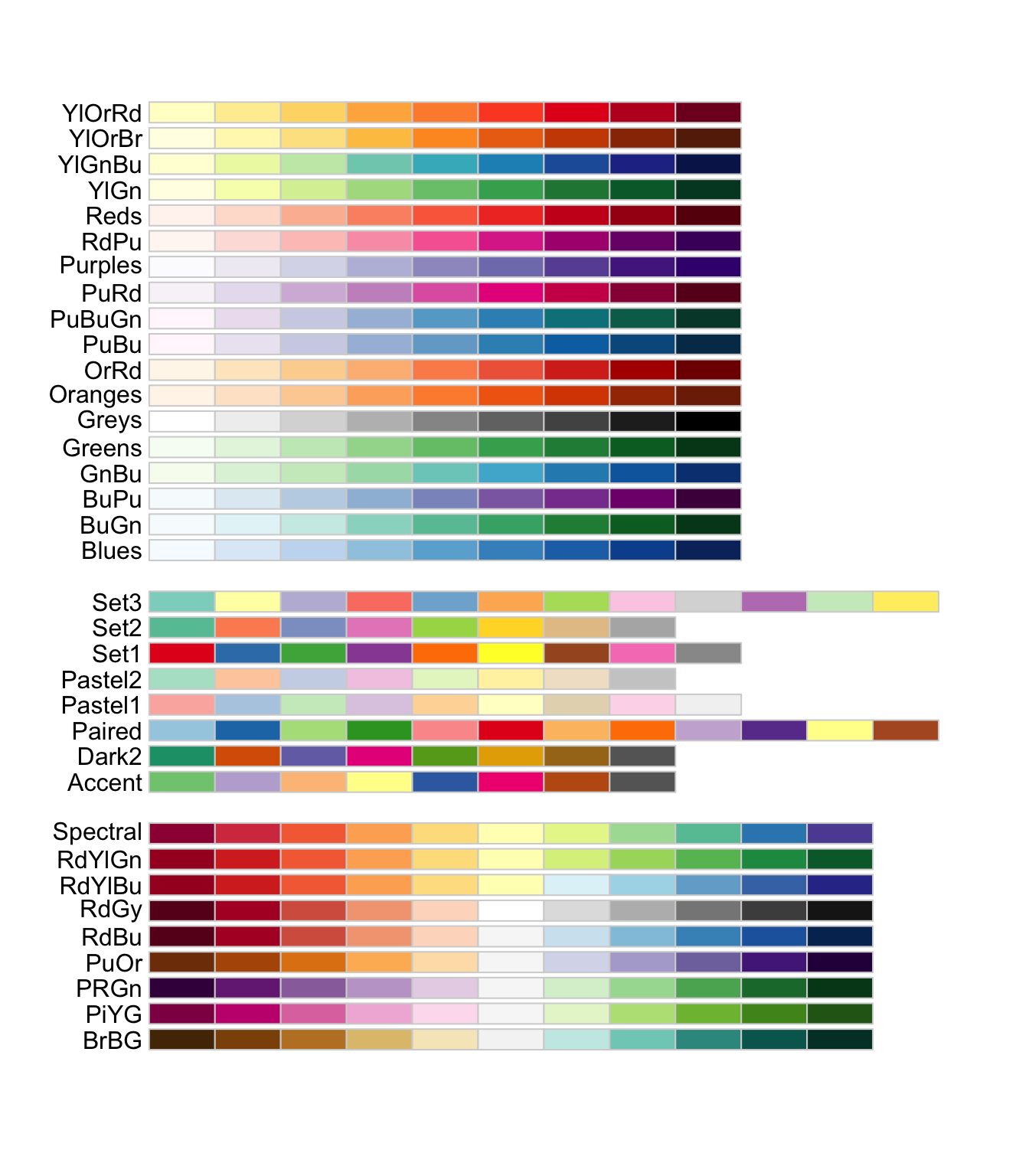
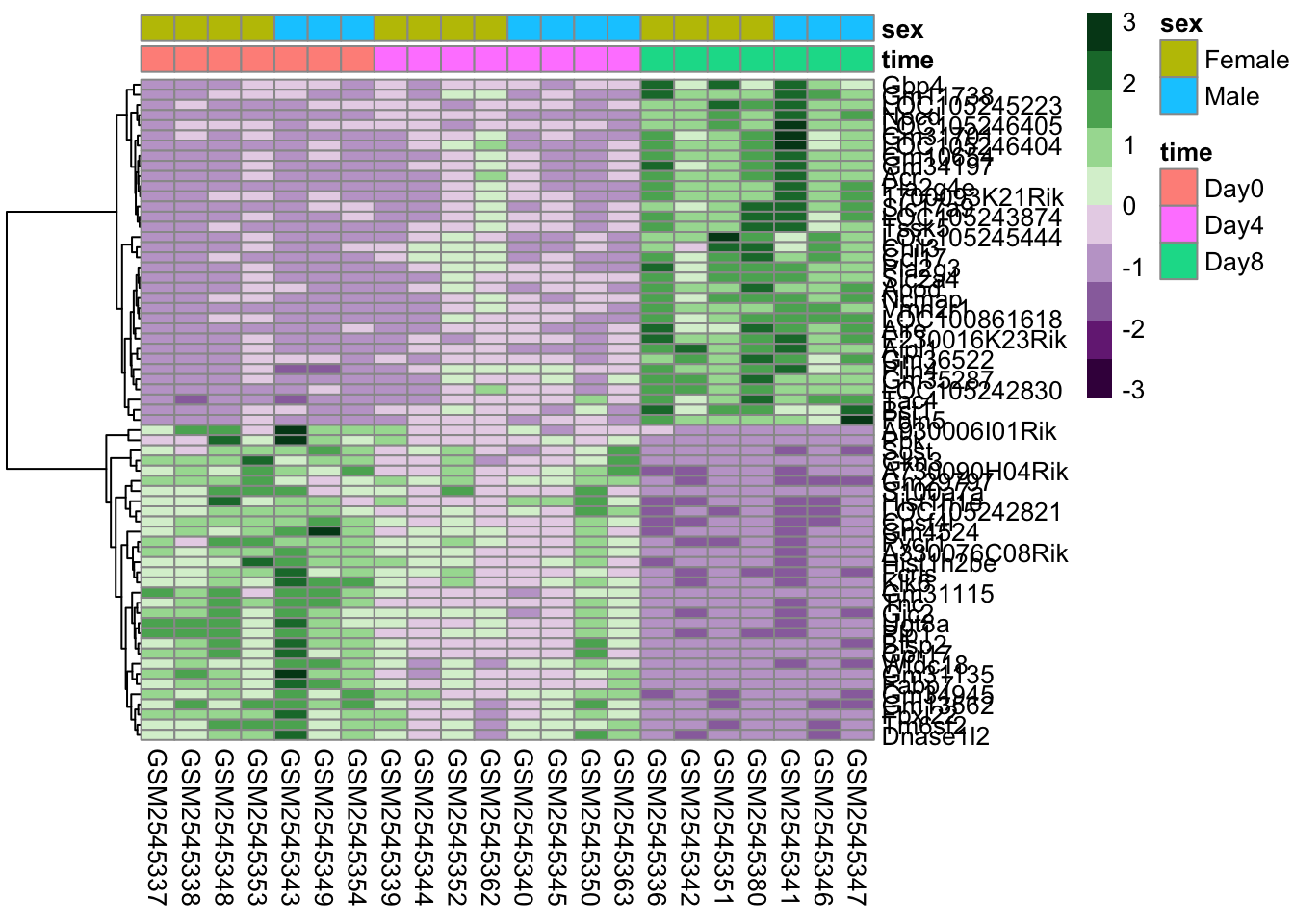
We can modify the color palettes as well. There are a number of diverging palettes that are available here: https://r-graph-gallery.com/38-rcolorbrewers-palettes.html. Here we’re using a PRGn (purple to green) color palette.

library(RColorBrewer)
col <- brewer.pal(10, 'PRGn') #
col
 [1] "#40004B" "#762A83" "#9970AB" "#C2A5CF" "#E7D4E8" "#D9F0D3" "#A6DBA0"
 [8] "#5AAE61" "#1B7837" "#00441B"

Once we have our palette, we can supply it as the color argument.

cluster_rows <- pheatmap(gse_data, 
         cluster_rows = T, cluster_cols = F, 
         clustering_distance_rows = 'correlation',
         annotation_col = col_sex_time,
         scale="row",
         color = col)

7.15 Saving our Heatmap

We can save a PDF of our heatmap using the pdf() function.

pdf("final_heatmap.pdf", height=10, width=8)
cluster_rows
dev.off()
quartz_off_screen 
                2 

7.16 Recap

We learned how to use the pheatmap package to cluster our data and produce heatmaps. We learned four different argumeents:

  • distance: “correlation” versus “euclidean”
  • scaling: “row”, “column”, and “both”
  • clustering: “row”, “column”, and “both”
  • adding column annotations

There are a lot more options for pheatmap, many of which are covered in this tutorial: https://biostatsquid.com/step-by-step-heatmap-tutorial-with-pheatmap/